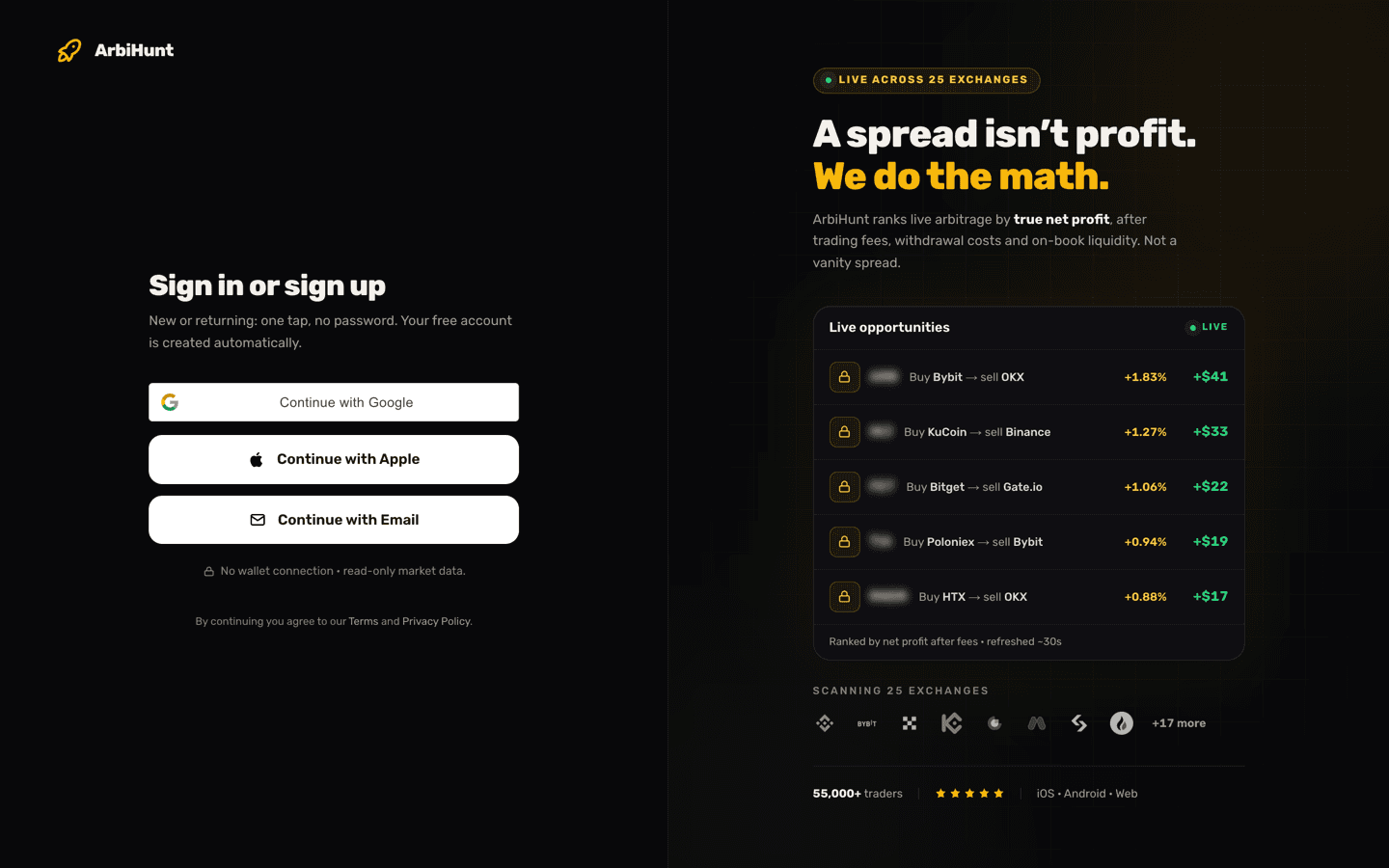
Free and PRO run on the same scan. The same 26 exchanges, the same 15,000-odd markets, the same 30-second refresh, the same ranking. PRO does not find different opportunities and it does not reorder them. What it changes is how much of each row you are allowed to read, and whether you can reshape the board.
One number draws the line: a 2% spread. The spread is the raw gap between the two prices, before any costs. Below 2%, the board is wide open on a free account. At 2% and above, the coin's identity is withheld.
What do both plans get?
Every account, paid or not, sees the live feed across all the tracked exchanges. (Individual venues are sometimes paused on purpose, after a withdrawal problem for instance. A paused venue drops out of the feed and is listed as Paused on the public exchange status page.)
On both plans, every row on the board carries:
- The route: which exchange to buy on, which to sell on.
- The spread %: the raw gap between the two prices, before any cost, computed from executable order-book prices, the lowest ask on the buy venue against the highest bid on the sell venue, not a mid-price ticker.
- Liquidity: the order-book depth behind the opportunity, in dollars.
- The network chip: the transfer chain the profit was worked out on, with a green check when both venues share it.
- Freshness: how long ago that row was last verified, ticking up in real time.
Three of the four tiles in the KPI strip are open to free accounts too: Live opportunities, Top spread, and Refresh rate.
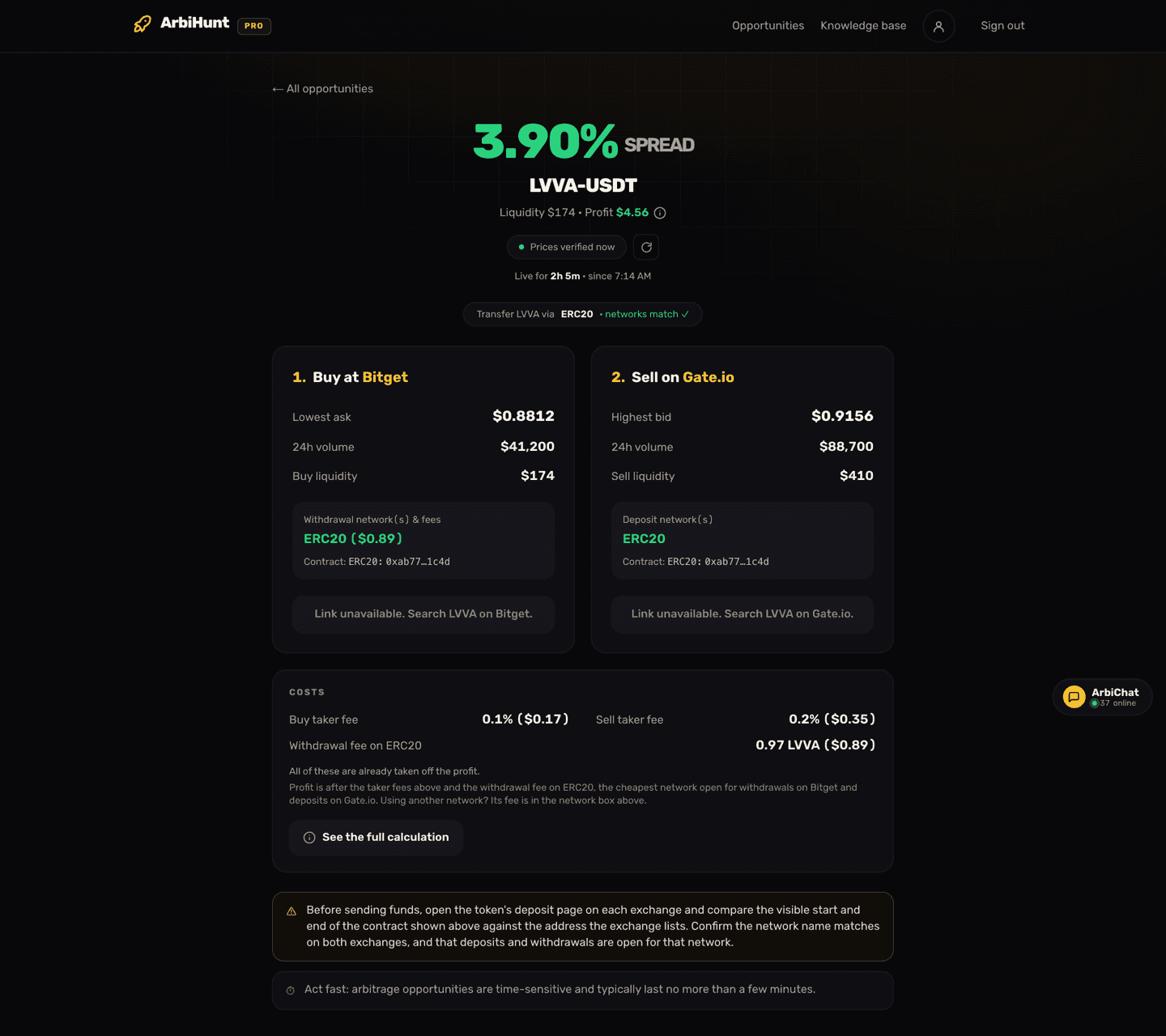
And for any opportunity with a spread under 2%, the rest of it is open as well. You get the coin name, the full opportunity detail screen with both leg cards (lowest ask, highest bid, 24h volume, per-leg liquidity, the withdrawal and deposit networks with their fees), the Costs card showing the taker fee on each leg and the withdrawal fee in coins, and the "Check on…" buttons that open the exact trading pages on both exchanges.
Search, the community ArbiChat room, the status page and the public arbitrage calculator are all free as well. On-chain (DEX) trades are free for everyone for now, profit included.
What does a free account see on a 2%+ row?
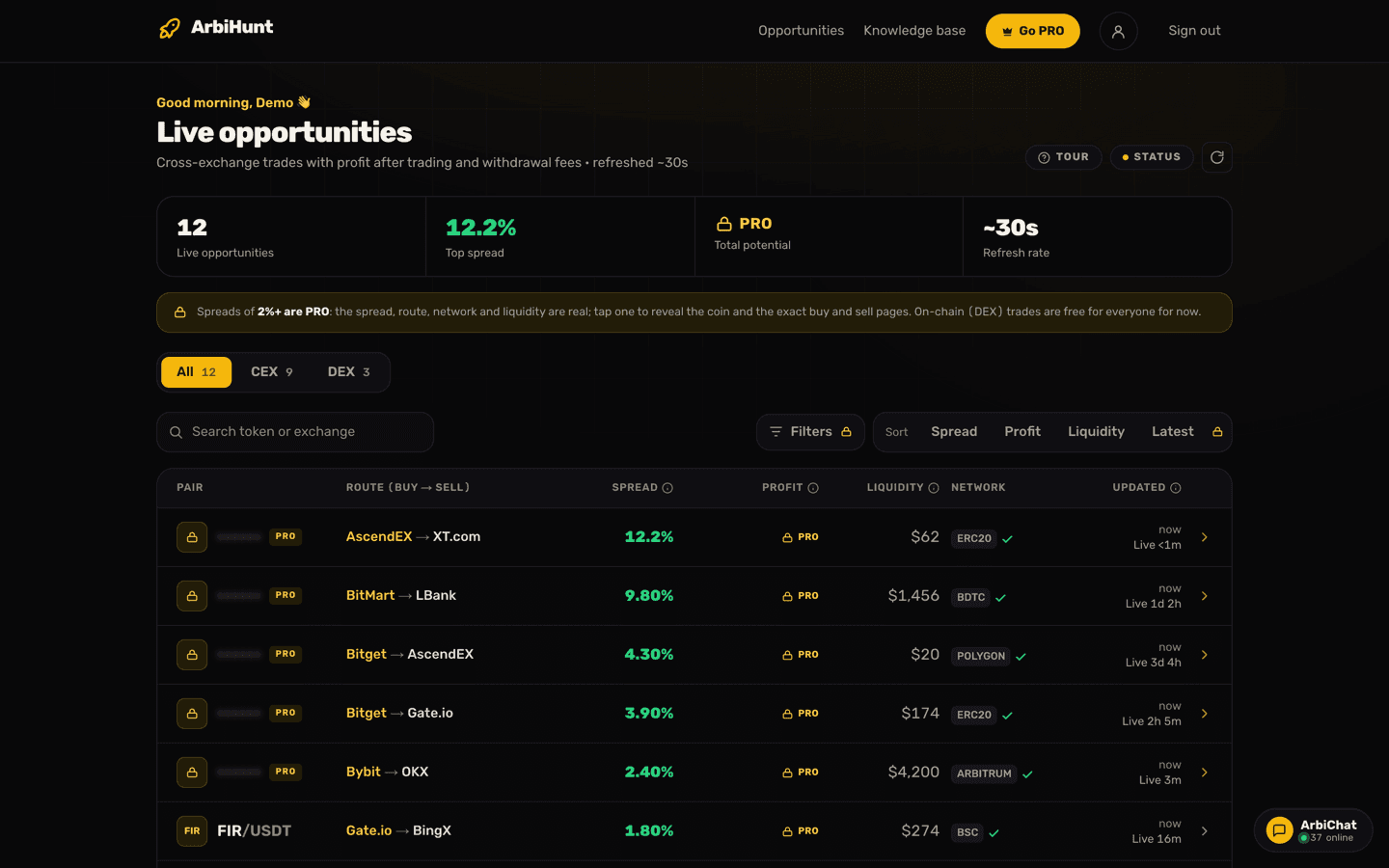
More than a typical locked preview. The row stays on the board, in rank order, and its numbers are the live ones: spread, route, liquidity, network and freshness are all real. What is removed is the coin's identity and everything you would need to act on it. The token name renders blurred behind a PRO badge, and the trade links and contract addresses are stripped on the server, so they never reach the browser at all. Tapping the row opens an upgrade prompt instead of the detail screen.
Two consequences of that are worth knowing in advance:
- Search cannot match a masked row, because the coin name is not there to match. When a search comes up empty on a free account, the board says so explicitly rather than pretending nothing exists.
- A row with an unknown spread is treated as PRO-only. That is deliberate: the gate fails closed, so a row that has not been classified is never leaked rather than accidentally shown.
At the bottom of a free board there is a running count of how many 2%+ spreads are live right now and the largest of them, which is the honest version of "here is what you are not seeing".
What is locked on free, and what is not
Held back on a free account:
- Profit in dollars, on every exchange row, including the sub-2% rows you can otherwise trade from. The column shows a padlock instead of a figure. On-chain (DEX) rows show it for now.
- The step-by-step calculation, the (i) beside each profit that shows every line from trade size to profit.
- The Total potential tile, the fourth KPI. It sums the profit across the feed, and those dollars are the PRO field.
- Rows with a spread of 2% or more: coin name, detail screen, trade links, contracts.
- Filters: minimum spread, minimum liquidity, exchange chips and network chips. A free account tapping Filters gets a "Filters are a PRO feature" prompt. Using filters to find opportunities walks through what they do.
- Sort: Spread, Profit, Liquidity and Latest are PRO. Free accounts see the board in its default order, widest spread first.
- Contract addresses on both legs, on the detail screen.
Not locked: Top spread is visible on a free account. Only Total potential is masked in the KPI strip.
You can still work out what a trade at your own size would pay
Say a free row shows a 1.80% spread with $274 of liquidity, and its Costs card lists 0.1% taker fees on both legs and a withdrawal fee of 1.3 FIR on BSC, about $0.20 at the lowest ask. On a $100 position: the gross gap is $1.80, the two taker fees take about $0.20, and the withdrawal fee does not shrink with your trade, so the whole $0.20 comes off too: roughly $1.40. Expect a little less in practice, because the spread is measured at the best price on each book and a real order walks deeper. That is your figure for your size, and it is not the one PRO prints: the profit on the row is measured at the row's own trade size, which the app shows as Capital and PRO prints as the first line of the (i), with the calculation behind it.
That example carries the most important point on the board, and it applies to free and PRO alike: the spread is the gap before any cost, and the profit is after the taker fee on both legs, on-book liquidity and the exchange withdrawal fee on the cheapest network open on both sides. Trades that would lose money after that fee are not listed. When an exchange gives no withdrawal fee we can confirm, nothing is deducted, and the Costs card reads "Not published, not deducted": check that fee yourself and take it off. Withdrawal fees explained covers how much the fee varies by chain, and Spread vs. net profit works through the full cost stack.
What changes when you go PRO
The board does not get redesigned. The columns are identical; the padlocks are gone.
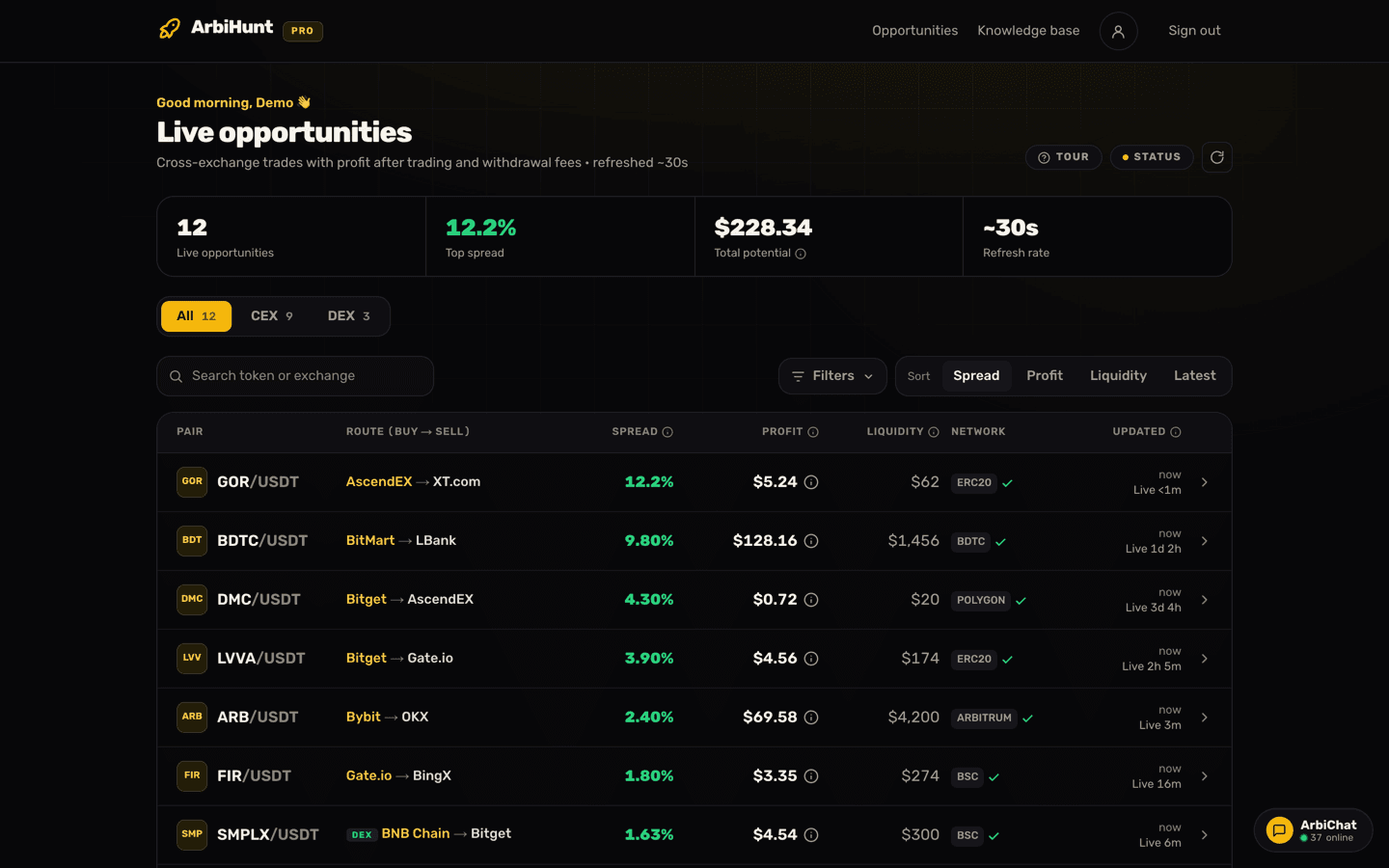
Specifically, PRO gives you:
- Every opportunity with a 2%+ spread in full: the coin, the detail screen, and the links straight to the buy and sell pages.
- Profit in dollars on every row, plus the Total potential tile.
- The calculation behind every profit. Tap the (i) beside a profit and it opens every step with the row's real numbers: trade size, sale value, both trading fees, the withdrawal fee in coins and dollars, the profit, and the return it makes on the trade size.
- Sort the board by spread, profit, liquidity or latest. Sorting by profit is a genuinely different ranking from sorting by spread, because the dollar figure is after every cost and capped by depth: a big spread sitting on $20 of usable liquidity cannot pay more than pennies, however good the row looks from the top of the board.
- Filters by minimum spread, minimum liquidity, specific exchanges and specific networks: the fastest way to cut the board down to the venues where you actually hold funded accounts.
- Contract addresses on both legs, so you can confirm the buy-side and sell-side coins are the same token before you transfer anything.
Same scan, more of it
PRO does not change how opportunities are found, priced or ranked. Every account is looking at the same live feed, with the same fees taken off. PRO unlocks the dollar figures, the calculation behind them, the widest spreads and the tools for sorting through them.
Free vs PRO at a glance
| What you get | Free | PRO |
|---|---|---|
| Live feed across 26 exchanges | Yes | Yes |
| Spread %, route, liquidity, network, freshness | Yes | Yes |
| Opportunities with a spread under 2%, in full | Yes | Yes |
| Withdrawal fee in coins, on the detail screen | Yes | Yes |
| Live opportunities, Top spread, Refresh rate | Yes | Yes |
| Search, ArbiChat, exchange status | Yes | Yes |
| Profit in dollars (exchange rows) | Locked | Yes |
| Step-by-step profit calculation | Locked | Yes |
| Total potential tile | Locked | Yes |
| Opportunities with a spread of 2% or more | Masked | Yes |
| Sort (spread, profit, liquidity, latest) | Locked | Yes |
| Filters (spread, liquidity, exchange, network) | Locked | Yes |
| Contract addresses on both legs | Locked | Yes |
| Referral program | Yes | Yes |
Read the board first
Open the live scanner on a free account and see how much of it is already usable before you decide anything.
What does PRO cost?
Prices are in USD and correct as of this update, but they change over time, so treat the Go PRO page as the live list rather than this article.
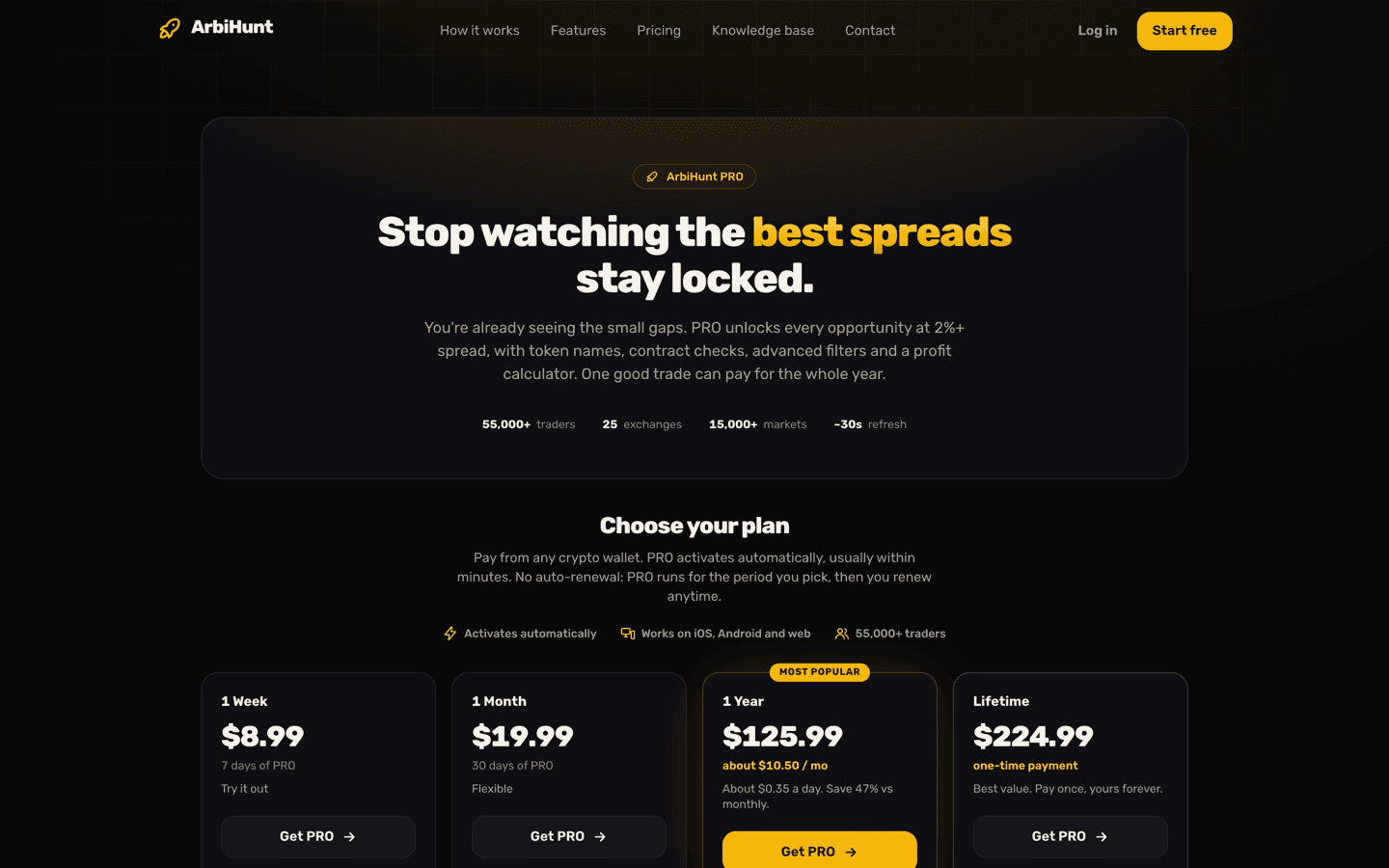
On the web you pay in crypto, and there are four plans: 1 Week $8.99, 1 Month $19.99, 1 Year $125.99 (about $10.50 a month, marked Most popular, roughly 47% off the monthly rate), and Lifetime $224.99 as a one-time payment.
Inside the iOS and Android apps you get the same three durations at the same prices ($8.99 a week, $19.99 a month, $125.99 a year) as auto-renewing App Store or Google Play subscriptions. There is no Lifetime tier in the stores. If you want Lifetime, you have to buy it with crypto on the web.
The three crypto routes
Pay from any wallet. USDT, USDC, BTC or ETH, sent from a wallet you control. USDT is accepted on Tron (TRC-20), BNB Smart Chain (BEP-20) and Ethereum (ERC-20); USDC on BEP-20 and ERC-20; BTC on Bitcoin; ETH on Ethereum. Checkout quotes an exact amount and holds that quote for a window: 60 minutes for the stablecoins, 90 for BTC, 30 for ETH, which is shorter because its price moves. The payment is spotted on-chain and PRO activates by itself once it has enough confirmations: 3 for BTC, 12 on Ethereum, 15 on BNB Smart Chain, 20 on Tron. In practice that is usually a few minutes.
Binance Pay and OKX Pay are the other two routes. Both are matched by hand against your account email, so allow a few hours rather than minutes.
Send the exact amount, on the exact network
The wallet route identifies your order by the precise amount you send, down to the last decimal place, so a rounded figure or a different network leaves nothing to match against. A payment that confirms after the window closes is still honoured, so do not send a second one. If something looks stuck, email contact@arbihunt.com instead.
Does PRO renew by itself?
That depends on how you paid, and it is the biggest practical difference between the two routes.
| Crypto on the web | Apple or Google | |
|---|---|---|
| Auto-renews | No | Yes |
| Lifetime option | $224.99, one-time | Not offered |
| Cancelling | Nothing to cancel | App Store or Google Play settings |
A crypto plan runs for the period you bought and then the account simply reverts to free. Nothing is stored and nothing is charged again; you renew when you decide to. Lifetime never expires.
A store subscription renews automatically until you stop it, and you stop it in your App Store or Google Play subscription settings, not inside ArbiHunt. Account → Subscription tells you which of the two you are on: the plan name, the status, the payment method, and either an expiry date or "Lifetime". Managing your PRO subscription has the step-by-step for renewals and cancellations.
Does PRO follow me across devices?
Yes. One account covers arbihunt.com, the iOS app and the Android app, and you sign in the same way on each: Google, Apple, or a link emailed to you, with no password. PRO is a property of the account, so however you paid for it, it applies everywhere you sign in.
Verify before you move funds
On either plan, ArbiHunt is an information tool. It never connects to your exchange accounts, never asks for API keys, never holds funds and never trades. Every order is placed by you. Before transferring, confirm the contract address matches on both exchanges (the same ticker can be a different or wrapped token) and that the network is open for withdrawal on one side and deposit on the other. PRO shows those contract addresses; free accounts can still check them on the exchanges' own deposit pages.
Nothing here is financial advice and there are no profit guarantees. Prices move in seconds and trades are not always executable at the size shown, so re-check on the exchange before you trade. If you are still finding your way around the board itself, start with how to read the ArbiHunt dashboard.
See it live
ArbiHunt scans 26 exchanges in real time and ranks every spread by true net profit, after fees, withdrawals and live liquidity.