This guide is written for someone who has never placed an arbitrage trade and is not sure they want to. By the end of it you will have a free account, you will be able to read a live opportunity line by line, and you will know exactly which checks stand between a promising-looking number and your money. Nothing here asks you to trade.
Give it about fifteen minutes. Sign-up takes under a minute of that; the rest is learning to tell a real opportunity from a good-looking one.
What is ArbiHunt, and what does it never do?
ArbiHunt is a scanner. It watches 25 crypto exchanges and roughly 15,000 markets, and about every 30 seconds it re-checks where the same coin is cheaper on one venue than another. It then ranks those gaps and shows you the arithmetic behind each one.
What it never does matters just as much. ArbiHunt does not connect to your exchange accounts, does not ask for API keys, never holds your funds and never places a trade. It has no way to move your money even if you asked it to. Every order is one you place yourself, on the exchange, with your own login. The scanner's whole job is to tell you where to look and what a trade would actually be worth.
Read-only by design
Because ArbiHunt only reads public market data, the worst a bad opportunity can do is waste your time. That is a deliberate trade-off: a scanner is slower than a bot, but it never has permission to lose your funds.
Nothing below assumes you have traded before. It assumes only that you know a coin can cost different amounts in different places.
How do you create an account?
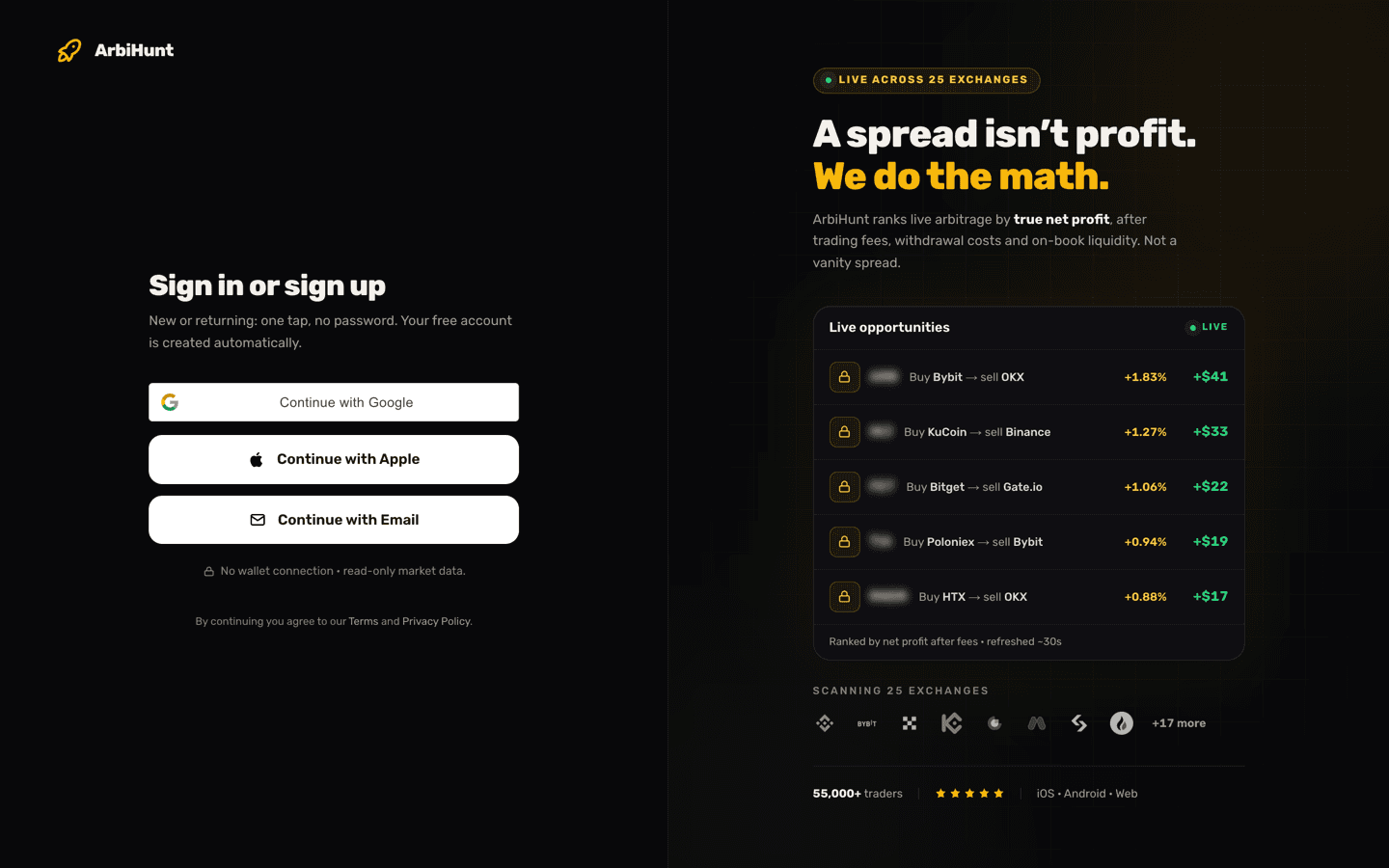
There is no password anywhere in ArbiHunt. The sign-in screen at the top of this page offers three routes, and all three create your free account automatically if you are new:
- Continue with Google or Continue with Apple, one tap.
- Continue with Email, which sends a 6-digit code to your inbox. Type it in and you are signed in.
If the code has not arrived after a few seconds, check your spam folder; a Resend button unlocks after about 45 seconds. You may also be asked to clear a quick "are you human" check before the email sends, which is normal and takes one click. A content blocker can stop that check from loading, in which case Google or Apple is the faster way in.
If you sign up by email you will be asked for a display name (Google and Apple bring one across), and it is only used so you appear as a person in the community chat rather than a blank. You can skip it and set it later in your account settings.
One account covers everything. The same login works on the website, the iOS app and the Android app, and if you ever go PRO, that status follows you to all three.
What can a free account see straight away?
Quite a lot, and it is real data rather than a demo. A free account gets the live feed across all 26 exchanges, refreshed roughly every 30 seconds, ranked with the widest spreads at the top.
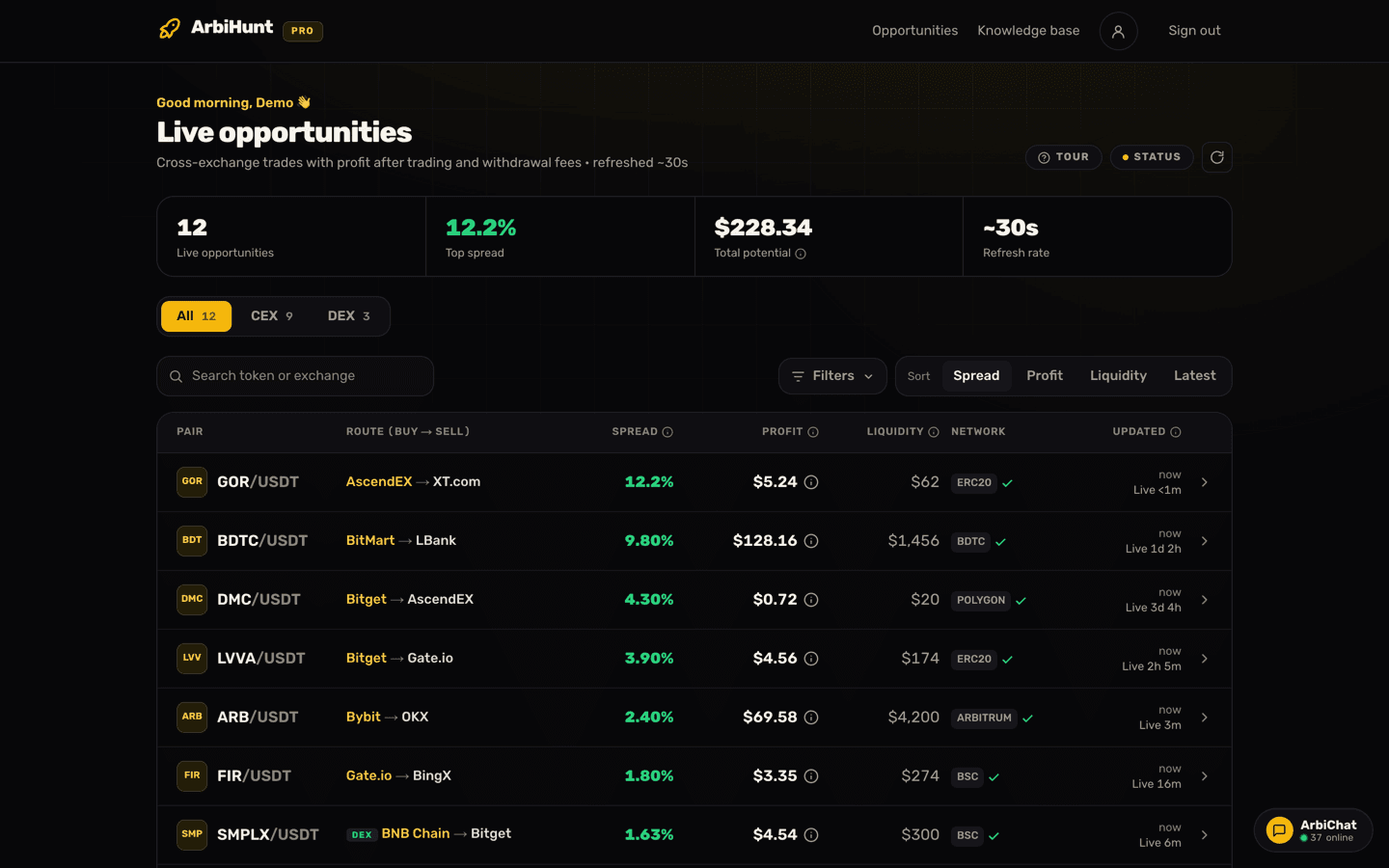
Three of the four tiles across the top are open to everyone: how many opportunities are live right now, the top spread on the board, and the refresh rate. Only Total potential is a PRO figure.
Below them, the board splits at one threshold, a 2% spread, the raw gap between the two prices:
- Under a 2% spread is completely open. You see the coin, the route, the spread, the liquidity, the transfer network and how fresh the data is, and you can open the full detail screen with both legs priced, the withdrawal fee in coins and a "Check on…" button through to each exchange.
- A 2% spread and above is PRO. A free account still sees the row, and the spread, route, network and liquidity on it are the real numbers. What is hidden is the coin name, which appears blurred behind a PRO badge, and the links to trade it.
Two other things are worth knowing before you go looking for them. The profit in dollars is PRO on every exchange row, including the open ones under 2%, along with the step-by-step calculation behind it; on-chain (DEX) rows show it to everyone for now. And the filters and the sort buttons are PRO too, so a free board stays in its default order, widest spread first. Search works for free, though it can only match rows whose coin name you can see. Community chat is open to everyone.
Take the 30-second tour
The dashboard has a Tour button next to the status pill. It walks you through the board on the real data in front of you and it is replayable, so there is no cost to running it now and again in a week.
How do you read a single row?
Every row is one trade idea: buy this coin here, move it, sell it there. Seven columns describe it.
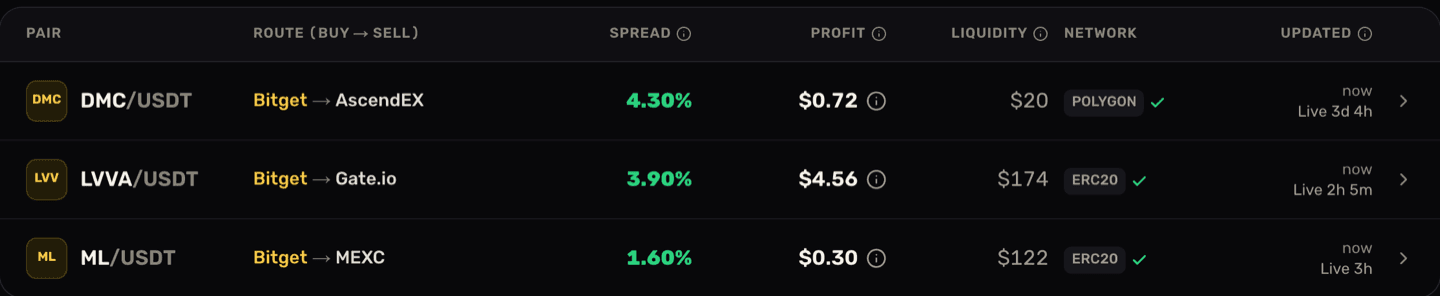
Reading the middle row across: LVVA/USDT is the coin and the currency you buy it with. Bitget → Gate.io is the route, buy on the gold exchange, sell on the second. 3.90% is the spread: the raw gap between the two prices, before any cost. $4.56 is the profit, what the trade leaves you after the taker fee on both legs and the fee for withdrawing the coin from Bitget. $174 is the liquidity, how much the order books can absorb before the price moves against you. ERC20 with a green tick is the transfer network, the one the profit was worked out on, and the tick means both exchanges support that same network, which is what makes the transfer possible at all. The last column shows how recently that row was re-checked, and it ticks upward in front of you.
Now read the top row the same way, and the lesson lands on its own. DMC shows the widest spread on screen, 4.30%, and pays seventy-two cents. There is $20 of depth behind it. The percentage is real; the money is not there. This is the single most common beginner mistake, and it is why the board gives you a dollar column rather than a leaderboard of percentages. On a PRO account the (i) beside each profit opens the full calculation behind it.
Why profit is the only number worth trading on
The spread is the raw gap between the two prices. Profit is what survives the trip. Three things eat the difference: the taker fee you pay to buy, the taker fee you pay to sell, and the flat network fee to move the coin between exchanges. Thin liquidity takes a fourth bite by pushing your fill price away from the quote. ArbiHunt takes all four off before it shows you a number, and a trade that would lose money after them is not listed.
Put real numbers on it with the free arbitrage calculator, which needs no account. Buy at $1.000, sell at $1.015, put in $1,000, pay a typical 0.1% taker fee on each side and a $1 withdrawal fee:
- Gross spread: 1.50%
- Net profit: $11.97, or 1.20%
- Breakeven spread: 0.30%
So a 1.50% gap keeps about four-fifths of its value here, and anything under 0.30% loses money no matter how good it looks. Now change one input: leave everything else alone and raise the withdrawal fee to $15, the sort of number an ERC-20 payout can reach when gas spikes. The same trade turns into a loss of about $2. The fee stack, not the spread, decides.
The withdrawal fee, already taken off
The Profit column is after the taker fee on both legs, the depth actually sitting on the books, and the exchange withdrawal fee on the cheapest network open on both sides. The detail screen's Costs card lists each of those costs and says they are already taken off. Two cases still need you: if you send on a different network, its fee differs, and if the card reads "Not published, not deducted", the exchange gave no fee we could confirm, so look it up and take it off yourself. See Withdrawal fees explained.
What to check before you risk any money
Do not trade the first row you like. Run this sequence instead, and run it while you still have nothing at stake.
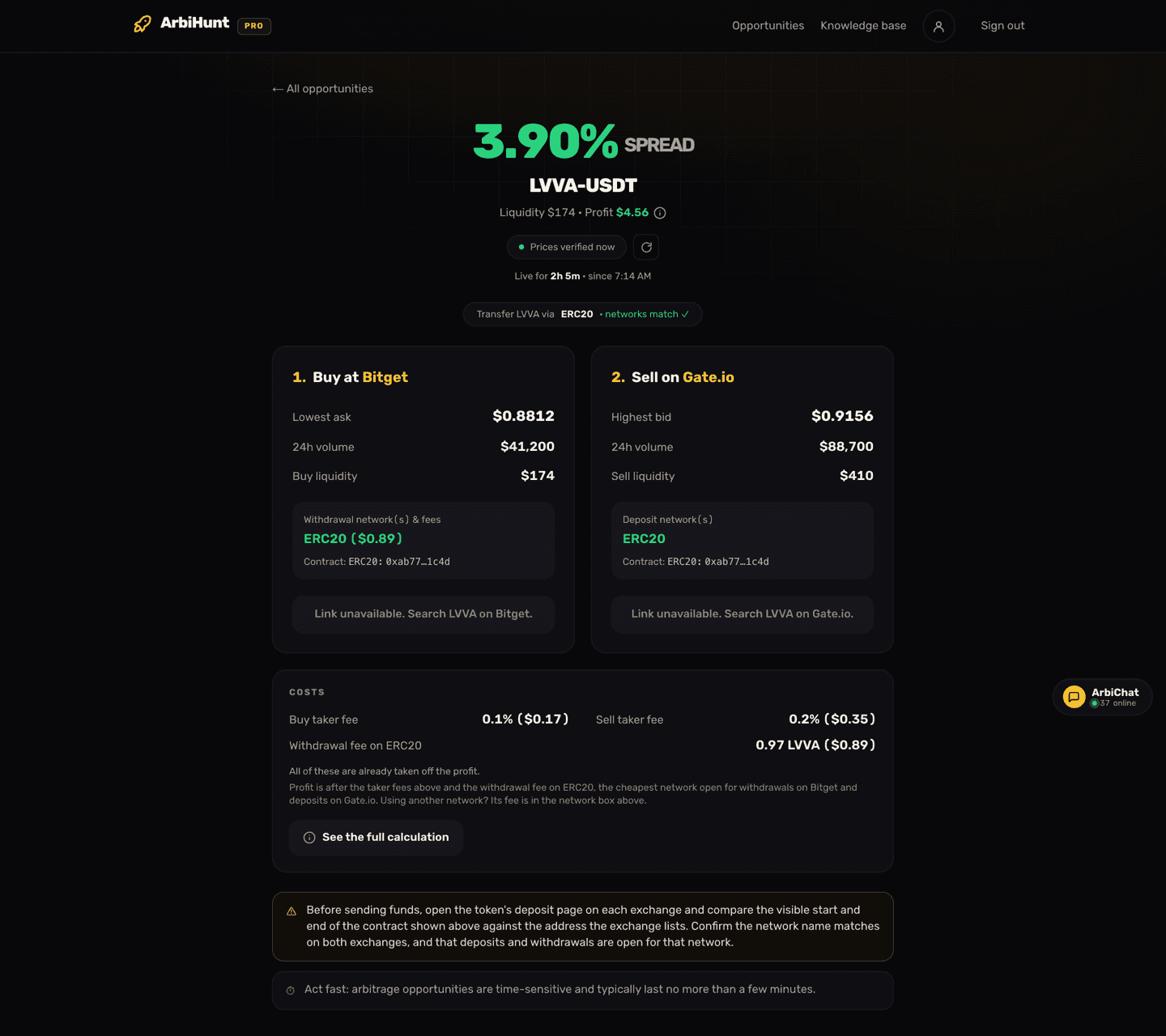
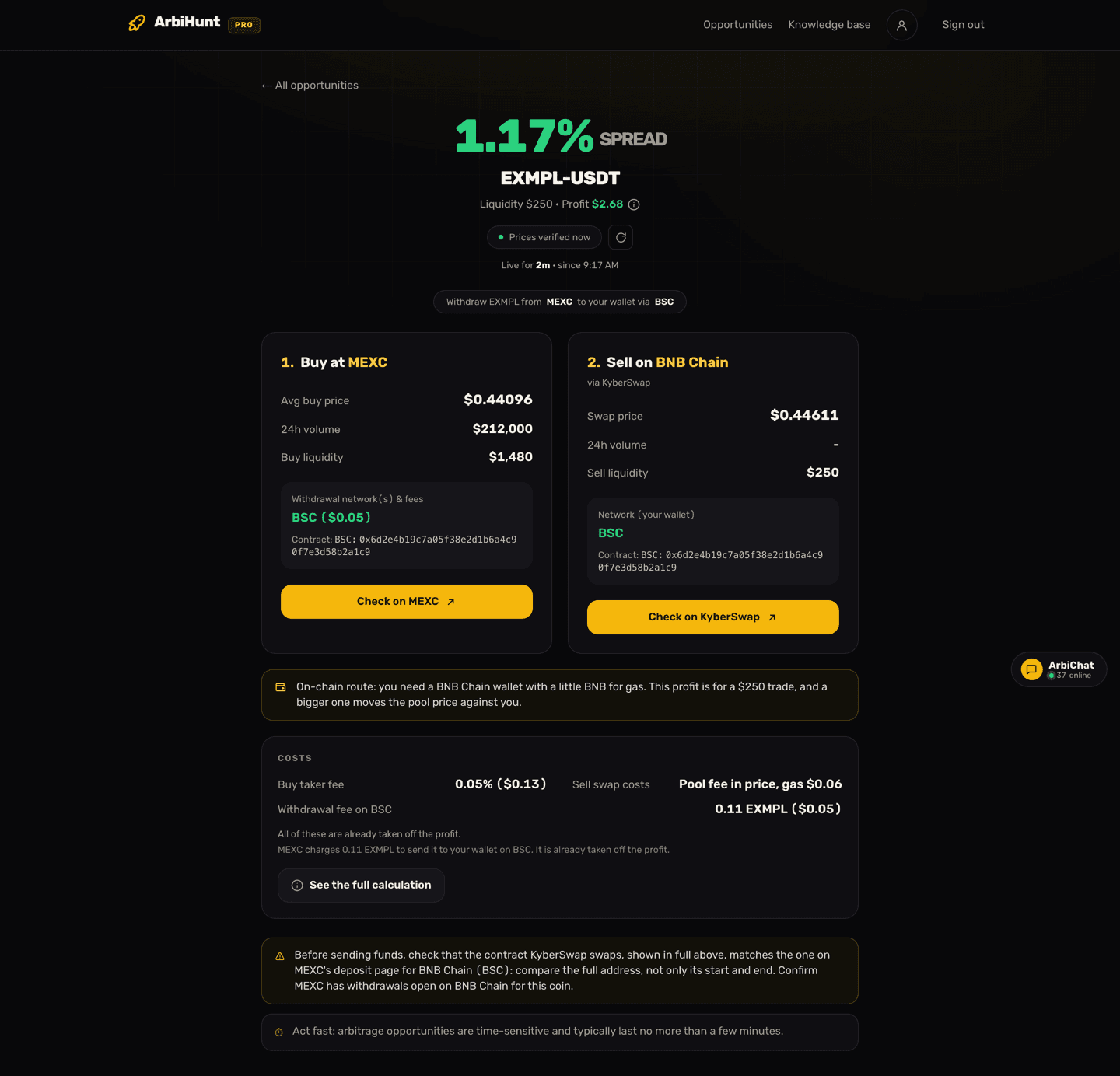
- Open the detail screen. Tap any row you can open. You get both legs side by side: the lowest ask you would buy at, the highest bid you would sell into, 24h volume, the liquidity on each side, the withdrawal networks the sending exchange supports with their fees, and the deposit networks the receiving exchange accepts. Every field is explained in Understanding the opportunity details screen.
- Confirm the networks match. Look for the "networks match" tick. If the sending exchange only pays out over a network the receiving one does not accept, there is no trade, and forcing it is how coins get lost.
- Confirm it is the same coin. Two tokens can share a ticker and be entirely different assets. PRO shows the contract address on both legs; whether or not you have it, open the deposit page for that coin on each exchange and check the addresses agree before anything moves.
- Check the venues are actually open. The public status page shows deposit and withdrawal health per exchange, and flags any venue whose tracking is paused on purpose. The 26 exchanges are not all live at all times.
- Have both accounts ready first. Registered, verified, funded, two-factor on. Doing this after you spot a spread guarantees you miss it.
- Redo the maths at your size. The board's profit is for the size the order books could take. If you trade less, the withdrawal fee stays the same, so take the real prices, your exchange's real taker fees and the real withdrawal fee into the calculator. If the answer is a few dollars, it was never a trade.
- Watch before you act. Sit with the board for a few sessions. You will start to notice which routes recur, which coins are always thin, and how quickly a number you liked disappears.
A window can close at any moment
ArbiHunt's own detail screen says opportunities typically last no more than a few minutes, and a spread can be gone in seconds. Every figure you see is a snapshot taken up to 30 seconds ago. Re-check the live prices on both exchanges immediately before you commit, and treat a stale row as gone.
When free stops being enough
PRO unlocks the coin names on every trade with a 2%+ spread, the profit in dollars on all rows with its step-by-step calculation, filters and sort, and contract addresses on both legs. Crypto plans start at $8.99 for a week and do not auto-renew.
Where to go next
You now have an account and can read the board. Pick the path that matches where you are:
| If you are… | Read this next |
|---|---|
| Still unsure what arbitrage is | What is crypto arbitrage? |
| Ready to learn the board properly | How to read the ArbiHunt dashboard |
| Preparing to place a first trade | How to execute an arbitrage trade |
| Still holding questions | Getting started FAQ |
A closing word, because it belongs at the entry point rather than buried further in. Nothing in ArbiHunt is financial advice, and no profit is promised or guaranteed. Arbitrage carries real risks, including transfers that arrive after the gap has closed, and every figure on the board is a live snapshot rather than a fill you are entitled to. Understand what can go wrong before your first trade rather than after it.
See it live
ArbiHunt scans 26 exchanges in real time and ranks every spread by true net profit, after fees, withdrawals and live liquidity.