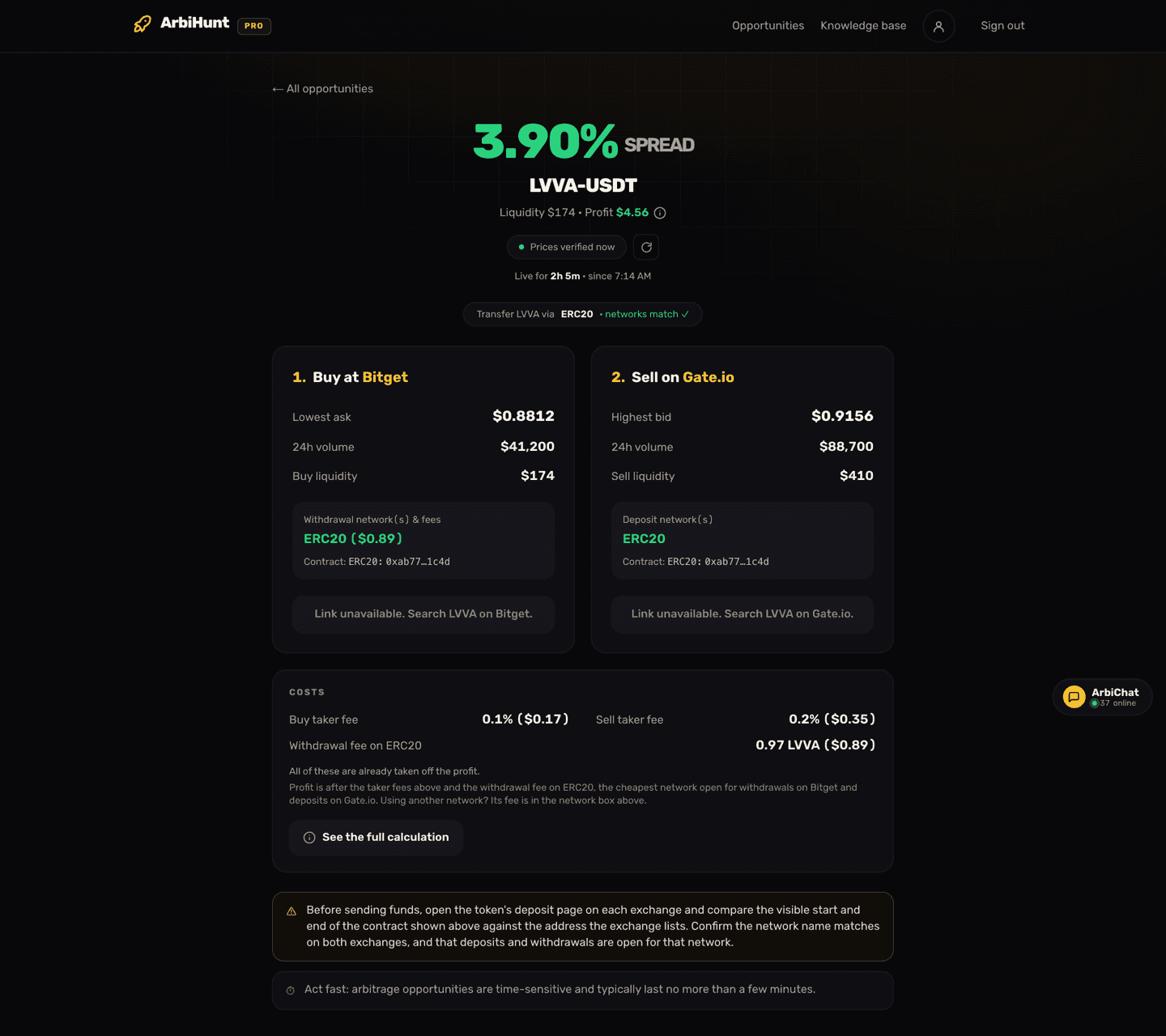
Tap a row on the dashboard and ArbiHunt opens the detail screen for that one trade, shown above. Everything you need to decide whether to trade it is on this page; everything you need to actually trade it is on the two exchanges. It is the last thing you look at before money moves, so it pays to know what each field measures, and what none of them can.
One point up front: the profit on this screen is already after the taker fees on both legs and the withdrawal fee for moving the coin, on the cheapest network open on both sides. You do not subtract the transfer yourself. The Costs card lists every one of those costs and says so in as many words.
What the big percentage at the top actually is
The headline is a large green percentage labelled SPREAD, with the pair underneath: the token and its quote currency, almost always USDT, like LVVA-USDT.
It is the same figure the dashboard shows in its Spread column: the raw gap between the lowest ask on the buy exchange and the highest bid on the sell exchange, read from executable order-book prices rather than a mid-price ticker. It is before every cost, so it is the headline, not the take-home: the profit on the next line is what the costs leave.
Under the pair sits a one-line summary:
- Liquidity: what the order books can absorb near those prices, in dollars. In the screenshot it tracks the thinner buy leg, and the thin side is what caps the trade.
- Profit: the dollar result at a size those books can genuinely take, after both taker fees and the withdrawal fee. It is the same value the dashboard shows in its Profit column. On exchange rows it is a PRO field, and PRO members get an (i) beside it that opens the full calculation.
Read the two together, always. In the screenshot above, a 3.90% spread on $174 of usable depth comes to $4.56 once the fees are out. A big percentage on a thin book is not a big trade: it is a small trade with a good ratio. Why the numbers diverge from the raw gap is the subject of Spread vs. net profit.
Free accounts and this screen
Opportunities with a spread under 2% open in full on a free account: route, spread, liquidity, networks, both leg cards, the Costs card with the withdrawal fee in coins, and the exchange links. Rows with a spread of 2% or more show an upgrade prompt instead of the breakdown. On exchange rows the profit in dollars and its calculation are PRO, sub-2% ones included; on-chain (DEX) rows show the profit to everyone for now. See Free vs PRO.
How old is this price? Read the freshness pill
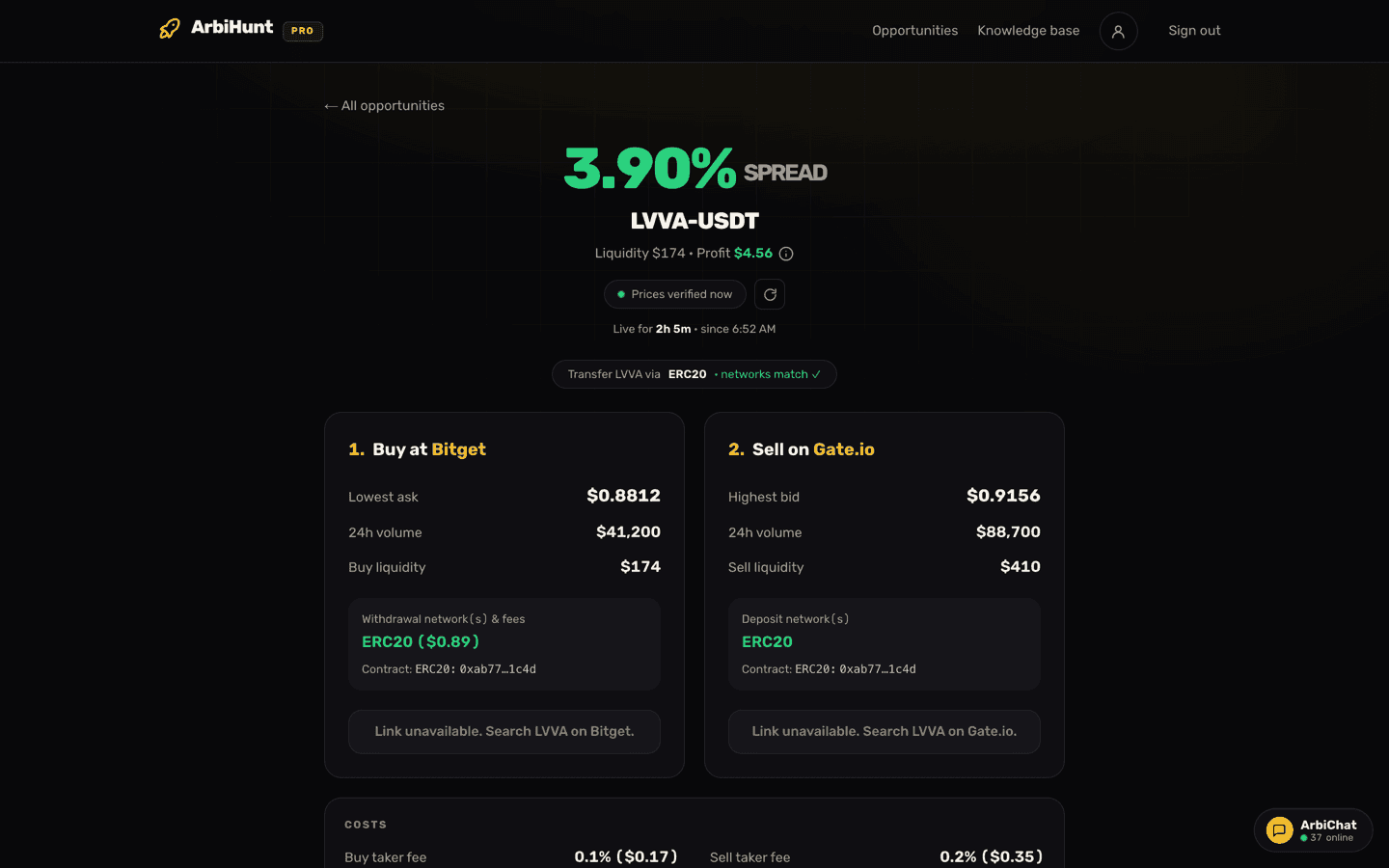
Directly under the summary line is a small pill reading Prices verified 3s ago, with a dot on the left and a circular refresh button beside it.
Treat it as a shelf-life label, not decoration:
- The dot pulses green while the numbers are under a minute old.
- Past 60 seconds the dot and the text turn amber. Nothing is broken; the page is saying it can no longer vouch for the figures.
- The page refreshes itself roughly every 30 seconds, pauses while the tab is hidden, and re-fetches when you come back. The button forces a refresh now.
Occasionally you land on an opportunity that has already left the live board. A banner above the headline then says the prices below are the last recorded values, with a live count of how long ago. Past about a day, or when the trade no longer makes money after the withdrawal fee, you get a plain "no longer live" page instead of dead numbers dressed up as tradeable ones.
What a networks-match tick does and does not guarantee
Below the freshness pill sits the route pill: Transfer [token] via [network], naming the chain ArbiHunt expects you to move the coin over. It is the network the profit was worked out on, the cheapest one open for withdrawals on the buy exchange and deposits on the sell exchange. A green networks match ✓ appears next to it when the withdrawal network listed on the buy exchange and the deposit network listed on the sell exchange are the same chain.
That is a genuinely useful filter: sending a coin over a chain the receiving exchange does not support is one of the few mistakes in arbitrage that is unrecoverable rather than merely expensive.
Here is what it does not mean:
- Not that the wallet is open right now. Exchanges suspend deposits and withdrawals for maintenance, congestion or delistings, often without warning. The status page tracks per-exchange deposit and withdrawal health, and some venues are deliberately paused.
- Not that the chain is a fast one. Its fee is already in the profit, but a slow chain can let the gap close while your coins confirm. See Choosing the right network.
- Not that the two exchanges list the same token. That is a separate check, below.
The two leg cards, field by field
The middle of the screen is two numbered cards: 1. Buy at [exchange] and 2. Sell on [exchange]. They mirror each other.
| Row | Buy card | Sell card |
|---|---|---|
| Price | Lowest ask: the cheapest price anyone is currently selling at | Highest bid: the best price anyone is currently buying at |
| Activity | 24h volume on this venue | 24h volume on this venue |
| Depth | Buy liquidity: what you can fill near that ask | Sell liquidity: what you can offload near that bid |
| Networks | Withdrawal network(s) & fees: the chains you can send on, each with its fee in brackets | Deposit network(s): the chains this venue will accept |
| Identity | Contract (PRO) | Contract (PRO) |
| Action | Check on [exchange] opens the market in a new tab, or prompts you to search for it | Same |
Three things are worth pausing on.
The prices on the cards are the top of each book, not what you pay. Bitget's lowest ask reads $0.8812, but buying $168 of LVVA walks past it: the calculation behind this row averages $0.882742 on the buy and $0.914106 on the sell, against a highest bid of $0.9156. The profit uses the averages, so slippage is already in it.
The withdrawal fee only appears on the buy card. The route pill names the chain; the buy card's network box names the chain and its fee, like ERC20 ($0.89) above. When the coin can leave on several networks, each is listed with its own fee, and the one the profit uses comes first. A network with no figure has no fee we could confirm.
Volume and liquidity answer different questions. 24h volume is a day's interest; liquidity is what sits on the book right now near the top price. A coin can trade $41,200 a day and still hold $174 of depth at the moment you want to buy, which is exactly what the cards above say.
Size against the thinner leg
Your position should sit comfortably inside the smaller of the two liquidity figures, not at it. Fill more than the book holds near the top price and your order walks down it, so your average price is worse than the ask or bid quoted here. That gap is slippage, and on a thin coin it eats the whole gap. Treat a fraction of the displayed depth as your ceiling, and remember the withdrawal fee does not shrink with your trade.
See the dollar figure, the calculation and the contracts
PRO unlocks the profit in dollars with its step-by-step calculation, contract addresses on both legs, filters and sorting across 26 exchanges.
The Costs card: every cost in the profit
Under the two legs sits a card headed COSTS: the costs behind the profit figure, short on purpose.
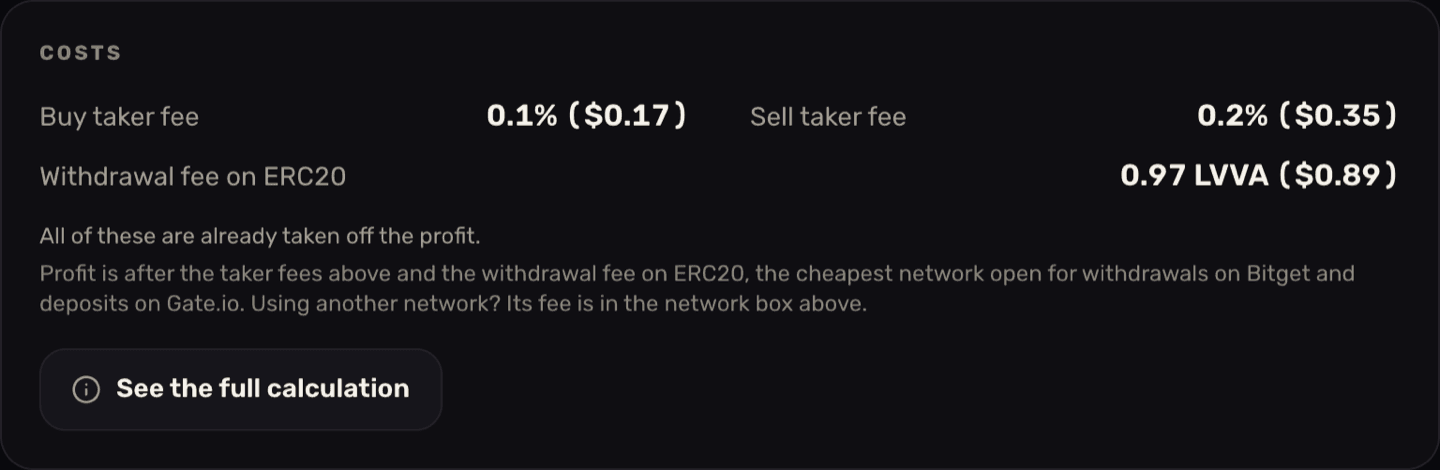
- Buy taker fee and Sell taker fee: the real per-venue rates, not a generic 0.1% assumption. They vary; this card shows 0.1% on Bitget and 0.2% on Gate.io. You pay one on each leg.
- Withdrawal fee on [network]: what the buy exchange charges to send the coin, in coins, here 0.97 LVVA. It can also read Free on [network] where an exchange genuinely charges nothing, None on this route when you buy on chain and nothing leaves an exchange, or Not published, not deducted when there is no fee we could confirm.
- All of these are already taken off the profit. That line is the one to remember. On a PRO account each cost also shows its dollar value.
- The note underneath names the network the profit used and why: the cheapest network open for withdrawals on the buy exchange and deposits on the sell exchange. Using another network? Its fee is in the buy card's network box: swap it in for the one on this card.
When the fee reads 'Not published, not deducted'
Some exchanges publish no withdrawal fee, and some publish a 0 on routes where every other venue charges, so ArbiHunt counts a 0 as free only where it has been checked. When the fee is unknown, nothing is deducted for it, and the note under the card tells you to check it on the buy exchange. Look it up there and take it off the profit yourself before you trade.
The full calculation (PRO)
PRO members can tap See the full calculation on the card, or the (i) beside the profit in the summary line, to open every step with this row's real numbers:
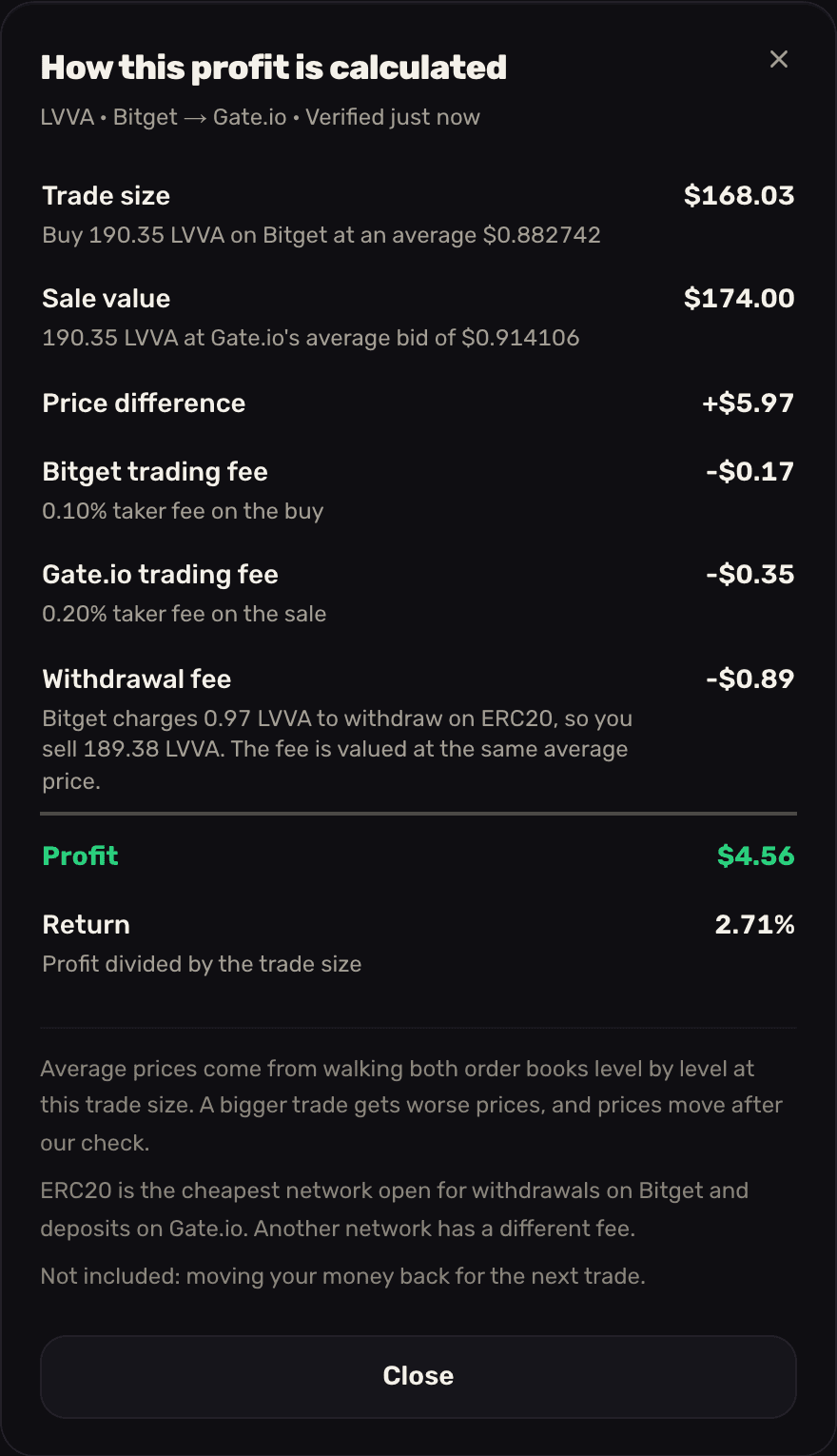
Read it top to bottom. The trade size is what you spend: 190.35 LVVA at the average fill of the Bitget book walk. The sale value is what those coins fetch at Gate.io's average bid. The difference, +$5.97, is the gap in dollars before any cost. Then the two trading fees come off, and the withdrawal fee: Bitget keeps 0.97 LVVA, so you sell 189.38 rather than 190.35, and those 0.97 coins are valued at the same average sale price, $0.89. What is left, $4.56, is the profit; divided by the $168.03 trade size it is the 2.71% return, well under the 3.90% spread in the headline, which is the gap at the best prices before any cost.
The footnotes say what the numbers assume. Average prices are for this trade size, so a bigger trade gets worse prices, and prices move after the check. The network note says why ERC20 was used. And one cost is never included: moving your money back to the buy exchange for the next trade, which is a second withdrawal and a second fee.
When the withdrawal fee is unknown, the (i) beside the profit becomes a gold alert glyph, and the withdrawal line reads "not deducted" with a note telling you to check the fee on the exchange and take it off yourself. The profit on such a row is before that fee.
Trading a different size
The profit is for the trade size in the calculation. On this LVVA row it is close to the $174 of liquidity, but that is not the rule: the trade size is how much the two books can match before the price gap, after trading fees, closes, and on many rows it is far smaller than the liquidity. The withdrawal fee is a flat number of coins, so it does not shrink with a smaller trade. Trade a quarter of this LVVA row, about $42, and you keep roughly $0.47 rather than a quarter of $4.56. At the calculation's 2.71% return, $42 would make $1.14, but that figure assumes the fee shrank with the trade. It does not, so the other three quarters of the $0.89 fee, $0.67, still come off. The arithmetic is worked through in Using filters, and withdrawal fees deserve a read of their own.
Why the contract address is the field that saves you
A ticker is a label an exchange chose, not an identifier. The same three or four letters can point to genuinely different assets across two venues: a project that migrated to a new contract where only one exchange updated its listing, a wrapped or bridged version that lives on a different chain, or two unrelated projects that picked the same symbol, which happens constantly among small caps, exactly where wide gaps live.
In each case the price gap is real and the trade is not: you buy on venue A, withdraw, and venue B either rejects the deposit or credits you nothing.
This is why ArbiHunt fetches the contract address per exchange instead of assuming two same-named coins are identical, and shows it on both leg cards (a PRO field). It renders masked, the start and end of the address, which is all you need to compare. Where a venue publishes no address for that market the field reads Check on exchange, which is a prompt, not a pass.
The first of the two notices at the bottom of the screen spells out the check. It takes under a minute:
- Open the token's deposit page on each exchange.
- Compare the visible start and end of the contract against the address the exchange lists.
- Confirm the network name matches on both sides.
- Confirm deposits and withdrawals are open for that network right now.
Different contracts means it is not the same coin
If the addresses do not line up, stop. Do not transfer, do not "try a small amount to see". Funds sent to an exchange that does not recognise the asset are frequently unrecoverable. A missing match is a reason to close the tab, not a puzzle to solve.
The second notice: a snapshot, not a quote
The last thing on the page is a timing reminder: arbitrage opportunities are time-sensitive and typically last no more than a few minutes. Read it alongside the freshness pill and, when the page shows one, the line under it such as Live for 2h 5m · since 14:03: how long this trade has been on the board so far, on your own clock, counting through gaps of up to ten minutes. It says how long the gap has held, not how long it has left. Between opening this page and clicking buy, the ask can move and the bid can thin out, so verify on the exchange itself immediately before you trade.
The order to check things in
When you open a detail screen, this sequence fails fast and wastes the least time:
- Freshness pill: green, or refresh.
- Liquidity: is there enough depth to make the buy, transfer and sell round trip worth doing?
- Networks match ✓: is the named network one you can and will send on?
- Profit at your size: the profit already has the fees taken off; if you trade smaller, or on another network, or the fee reads "not deducted", adjust it.
- Contracts: same asset on both sides, deposits and withdrawals open.
- Then the "Check on [exchange]" links, and only then any funds.
Step four is where most opportunities die, and that is fine. A screen full of rows you correctly declined is the tool working.
ArbiHunt finds and prices opportunities; it never connects to your exchange accounts, never asks for API keys, never holds funds and never places a trade. Every order and transfer is yours. For the full sequence once a row is worth it, see How to execute an arbitrage trade.
Nothing here is financial advice. Prices can move in seconds, opportunities may not be executable at the size or price shown, and you trade at your own risk.
See it live
ArbiHunt scans 26 exchanges in real time and ranks every spread by true net profit, after fees, withdrawals and live liquidity.