Every cross-exchange arbitrage trade contains one step that has nothing to do with trading: moving the coin from the exchange you bought it on to the one you want to sell it on. You choose the blockchain it travels over, and that choice decides three things, in this order of importance: whether the coins arrive at all, what the move costs, and how long you wait. Get the first one wrong and the other two stop mattering.
Why one coin has several networks
Big tokens are issued on more than one chain. The same USDT balance can exist as an ERC-20 token on Ethereum, a TRC-20 token on Tron, a BEP-20 token on BNB Smart Chain, and on Solana or Polygon besides. Same ticker, same price, completely separate rails, and the rails you pick decide both the fee and which addresses can receive the coins.
The opposite case is more common on an arbitrage board than people expect: most small-cap listings travel on exactly one chain, often their own, so the network chip just repeats the ticker. The real question therefore ranges from "which of five chains" down to "this one chain, take it or leave it".
Compatibility comes before price
The rule is two separate switches that both have to be on for the same chain:
- The sending exchange has withdrawals open for that coin on that chain.
- The receiving exchange has deposits open for that coin on that chain.
Note the phrasing. It is never "does this exchange support Polygon", since every large exchange supports Polygon for something. It is "does this exchange support this coin on Polygon, right now". A chain can be open for USDT and closed for the token you are actually moving, on the very same venue.
So the question is never "what is the cheapest network?" It is "what is the cheapest network both exchanges support for this coin?" Compatibility first, price second, speed third.
What the networks-match tick actually checks
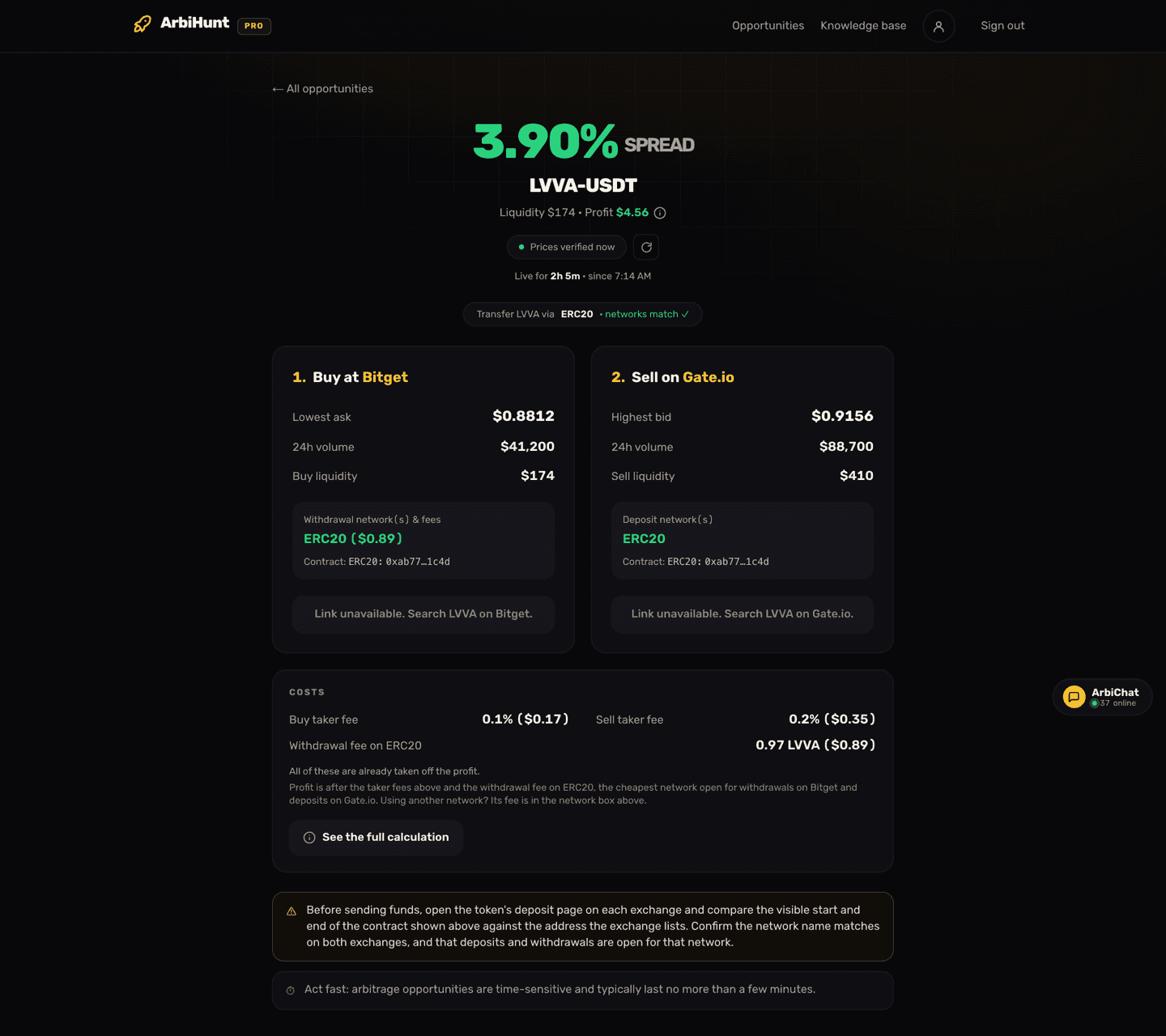
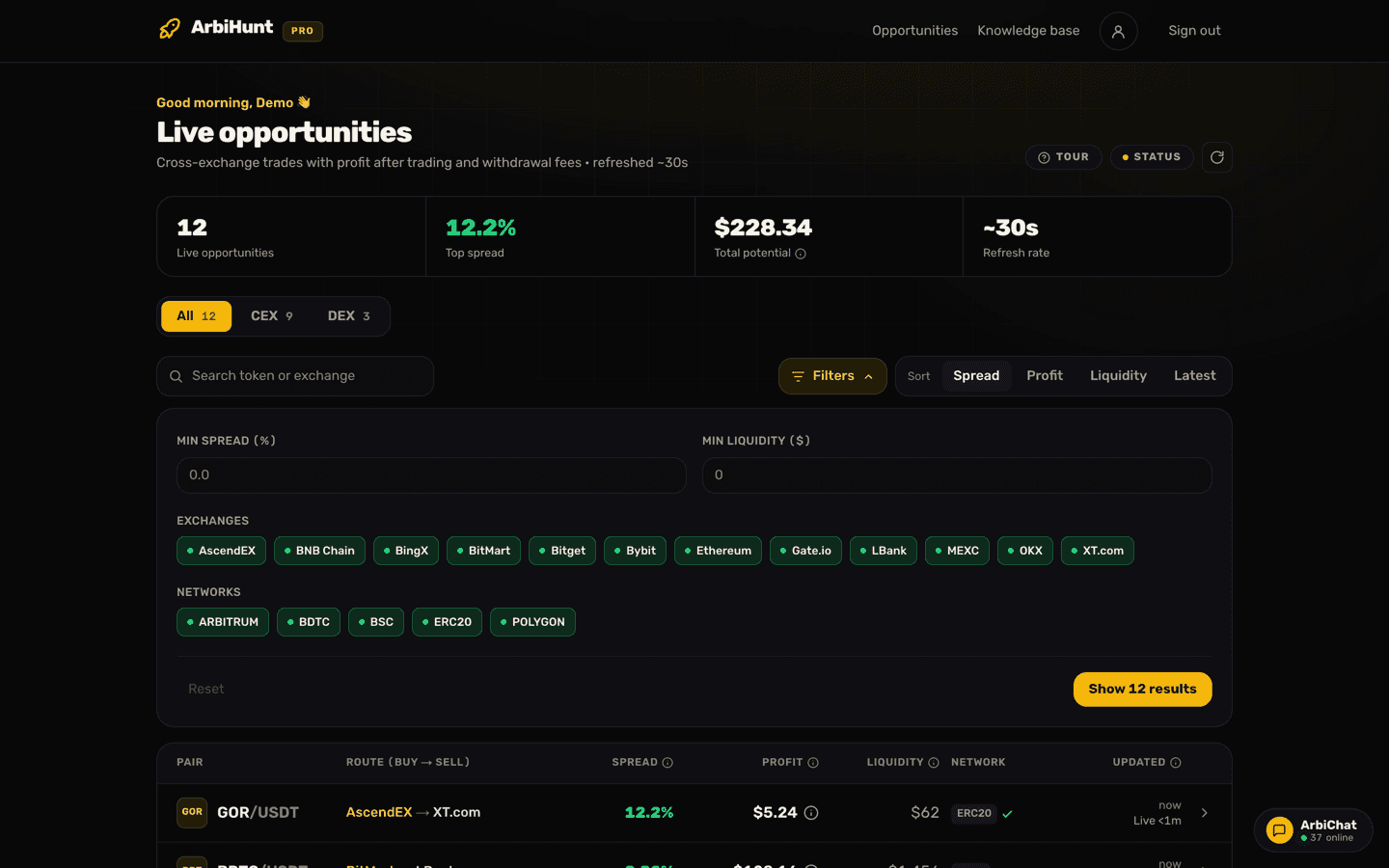
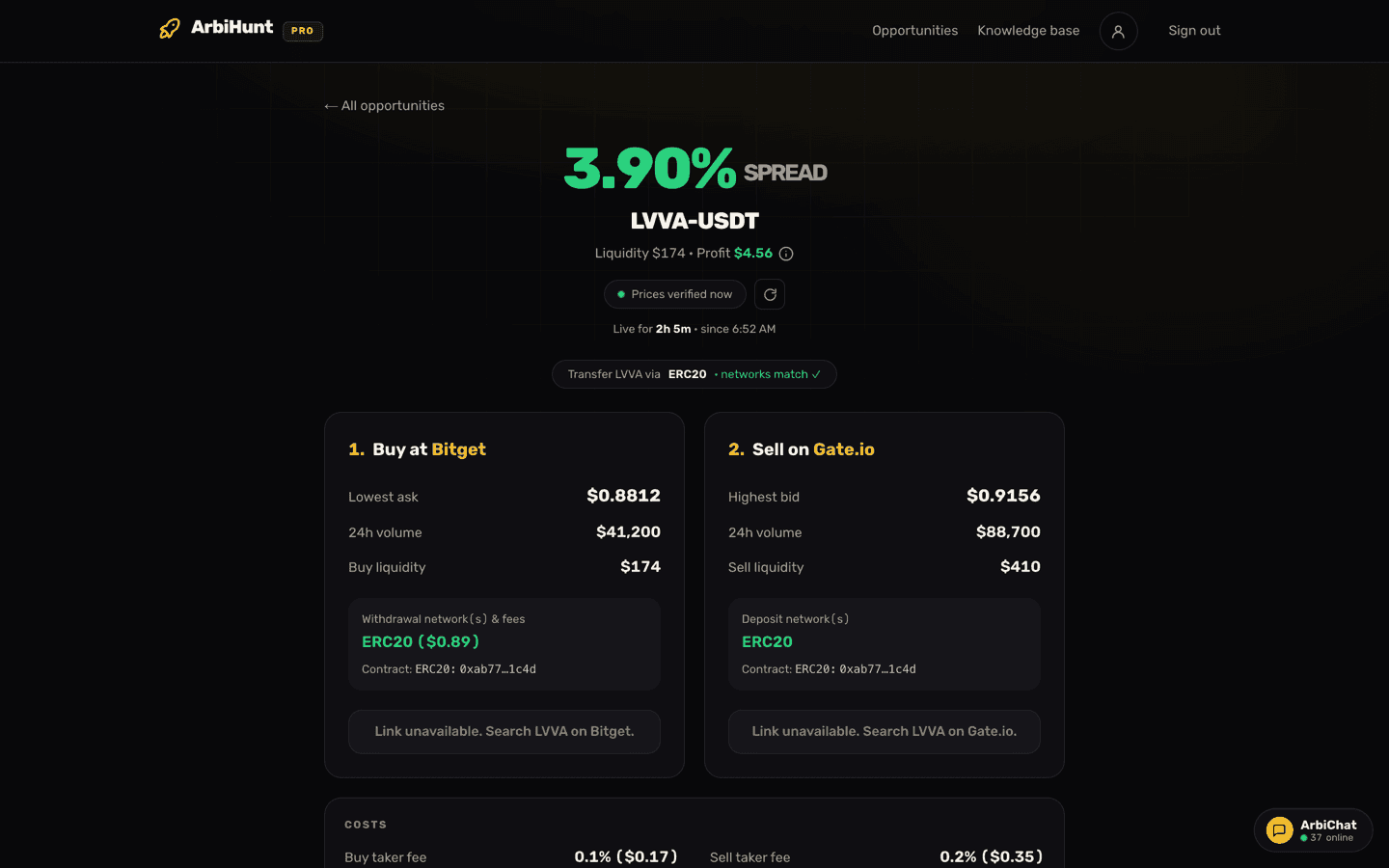
On the board, each row carries a network chip with a green tick beside it when the chains line up. On the opportunity screen the same thing becomes a pill above both legs, naming the coin, the chain it should travel over, and networks match when they do.
Behind that tick, ArbiHunt does this for every opportunity:
- Takes every chain the buy exchange lists for that coin that is not reported as withdrawal-disabled.
- Takes every chain the sell exchange lists for that coin that is not reported as deposit-disabled.
- Normalises the names, because exchanges spell the same chain differently. Ethereum, ETH and ERC-20 collapse to one name; BSC, BEP-20 and "BNB Smart Chain" to another. Look-alikes that are genuinely different chains stay apart, so an L2 is never merged into its L1.
- Throws away placeholder labels some APIs return instead of a real chain, such as "NONE" and "UNKNOWN". Without that step, two coins both labelled "none" would appear to match and produce a route you could never settle.
- Shows the tick if at least one chain survives in both lists.
There is one more gate. Where both exchanges publish a contract address for every shared chain and every one of those addresses disagrees, the tick is withheld: that pattern means the two listings are different tokens wearing the same ticker.
The pill names the cheapest shared chain: open for withdrawals on the buy exchange, open for deposits on the sell exchange, with the smallest withdrawal fee. That is the chain the profit is worked out on, and its fee is already taken off. A missing fee is treated as unknown and is not deducted, and a zero counts as free only where we have verified it, because some exchanges report 0 on routes where every other venue charges. When no shared chain has a fee we can confirm, the pill names the first chain both venues share, the profit on that row is before the withdrawal fee, and the Costs card says so. Read the named chain against the deposit networks on the sell leg before you trust it.
What the tick does not guarantee
It is a strong filter, not a promise. Five things it does not tell you:
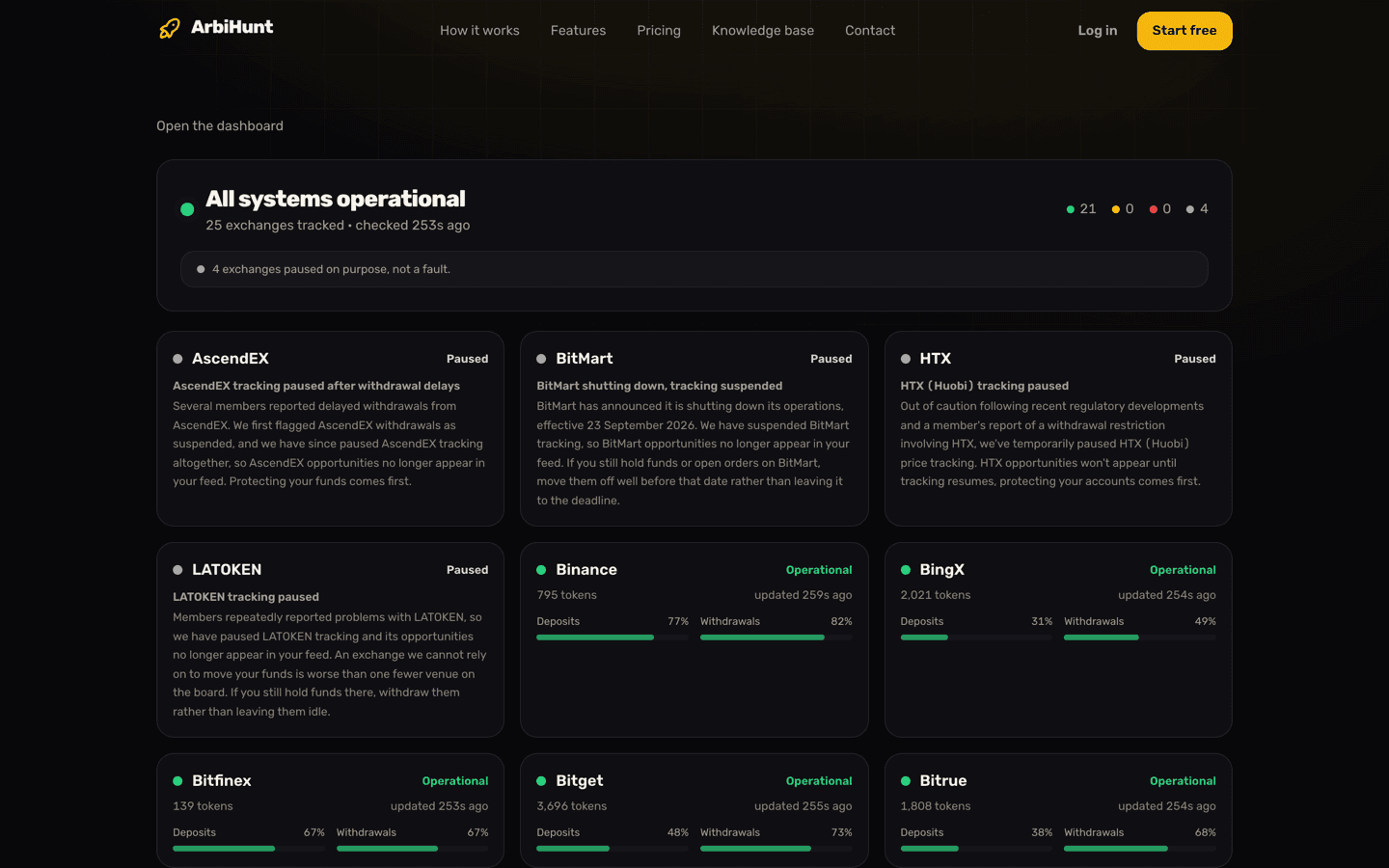
- That the chain is open at all. The test is that the exchange has not reported the chain as disabled, so a chain it publishes no availability flag for counts as usable. Availability also refreshes on a slower cycle than the roughly 30-second price loop, so a chain suspended minutes ago can still read as open. The status page shows deposit and withdrawal health per exchange and flags venues paused on purpose.
- That the two listings are the same token, when contracts are not published. Many venues return "Check on exchange" instead of an address, and the identity check can only fire when both sides publish one for every shared chain. PRO shows the contract on each leg with the middle masked; compare the visible start and end characters against the address on each exchange's deposit page.
- That it is the cheapest route available. Routes whose fee the exchange does not report are skipped in the pick, so a genuinely free chain can lose to one with a small but confirmed fee.
- That it is the fastest route. Nothing in the tick considers confirmation times.
- That the chain does not need a memo. More on that below.
The reverse matters too: a missing tick is not proof the trade is impossible, since it can also mean one venue reported no chain list at all. It does mean no shared route was confirmed, which is reason enough to check by hand before committing capital.
Sending on a chain the receiver does not credit
Wrong chain, and the coins are usually gone
If you withdraw on a chain the receiving exchange does not credit for that coin, the transaction still succeeds on-chain. The coins land at an address nobody is watching on your behalf. Some exchanges run a manual recovery for common chains, at their discretion, sometimes for a fee, but many do not, and there is no support ticket that reverses a confirmed transfer. Confirm the chain name on both exchanges before you press withdraw.
EVM chains make this easy to get wrong, because they share an address format. The same address starting with 0x is valid on Ethereum, BNB Smart Chain, Polygon, Arbitrum and Base. Paste a Polygon deposit address into a withdrawal form set to Ethereum and nothing looks wrong: the address validates, the withdrawal confirms, and the money does not arrive.
On a route you have not used before, a small test transfer settles it for the price of one extra flat fee. On a $2,000 move that is cheap insurance; on a $150 move the test can cost more than the trade earns, which is its own answer about whether to bother.
Memo and tag chains need a second field
Some chains do not give each customer their own deposit address. The exchange publishes one shared address and routes incoming funds by a second value you must include: a memo, tag, comment or note, depending on the chain. XRP, Stellar, TON, EOS, Cosmos and Hedera all work this way.
Send without it and the funds land in the exchange's pooled wallet with nothing tying them to you. Recovery is a manual support process at best.
ArbiHunt does not tell you whether a chain needs a memo. That lives on the exchange's deposit page, on the same screen where you copy the address, and it says so plainly. Copy both fields and paste both into the withdrawal form.
Pricing the route
The two numbers on each row mean different things. The dollar profit is the trade walked through both order books, net of the taker fee on each leg and of the withdrawal fee on the chain the row names: the first network in the pill, and the first one listed in the buy leg's withdrawal box. The percentage is the spread, the raw gap between the two prices before any of those costs, so it says how wide the gap is, not what it pays.
So the route is already priced. What it cannot price is a different choice from yours. Take an $800 position on a 1.6% spread, with a 0.1% taker fee on each side:
| Line | Amount |
|---|---|
| Gross spread, 1.6% of $800 | $12.80 |
| Both taker fees, roughly 0.2% round trip | -$1.61 |
| Before the withdrawal fee | ~$11.19 |
Now the chain, a flat fee that ignores how big your trade is:
| Withdrawal fee on the chain you use | What you actually keep |
|---|---|
| $0.30 | $10.89 |
| $6.00 | $5.19 |
| $18.00 | -$6.81 |
Same coin, same spread, same trading fees. The chain alone moves the result from a solid win to a real loss. If all three chains were open on both sides, ArbiHunt would name the $0.30 one and show about $10.89. Send on the $6 chain instead and you keep $5.19, so take the $5.70 difference off yourself. And a route whose only shared chain costs $18 would never reach the board, because it loses money after the fee. Because the fee is flat, its bite is also a function of size: $6 is 0.75% of an $800 trade and 4% of a $150 one. Withdrawal fees and networks explained works through the break-even sizes, and Spread vs. net profit covers everything else between the headline percentage and what lands in your account.
Speed is the third input, and it is not free either. A cheap chain that takes forty minutes to confirm can deliver your coins into a spread that closed twenty minutes ago. When two compatible chains are close in price, the faster one usually wins; deposit and withdrawal times explains where the waiting comes from and why pre-funding both sides removes most of it.
Keeping the board to chains you are happy to use
You do not have to evaluate every chain that appears. The filter panel, opened from the Filters button above the board, carries a Networks row of chips alongside min spread, min liquidity and exchange chips. Every chip starts on; tap one off and rows on that chain leave the board, with the Show button counting what survives. The list is built from the chains present on the board right then, so it changes through the day, and a chip matches the route chain in the Network column, the one the profit was worked out on, not every chain the coin could travel on.
Use it to switch off chains you have no wallet or experience with, to hide memo chains when you would rather not deal with tags, or to drop a chain that is congested today. Filters and sort are PRO features; on a free account the button opens an upgrade prompt. Using filters to find opportunities covers the rest of the panel, and Understanding the opportunity details screen shows where each network field lives on one trade.
Filter the board down to chains you actually use
PRO adds the network, exchange, spread and liquidity filters, sorting, the profit in dollars with its step-by-step calculation, and the contract address on both legs, across 26 exchanges refreshed roughly every 30 seconds.
Before you hit withdraw
- Open the coin's withdrawal page on the sending exchange and its deposit page on the receiving exchange side by side, and confirm the same chain name appears on both for that coin.
- Check the chain is actually enabled on both sides, not merely listed.
- Compare contract addresses wherever both exchanges publish them. A matching ticker proves nothing.
- If the chain uses a memo or tag, copy it with the address and paste both.
- Re-read the withdrawal fee as you withdraw. If it differs from the one on the row's Costs card, or you use a different chain, adjust the profit by the difference and check it still pays at your size. Fee schedules change without notice and gas-driven fees move hour to hour.
ArbiHunt is an information tool. It finds and ranks opportunities across 26 exchanges, but it never connects to your exchange accounts, never asks for API keys, never holds funds and never trades. Every withdrawal and every order is placed by you. Figures on screen are live snapshots that can change between the scan and your execution, spreads close quickly, and nothing here is financial advice.
See it live
ArbiHunt scans 26 exchanges in real time and ranks every spread by true net profit, after fees, withdrawals and live liquidity.