"I placed a limit order and it has been sitting there for ages. Why is it not filling?" It is one of the most common questions we get, and the answer is almost always on the screen already, in the order book. Once you can read one, you can predict how long an order will wait, what a market order will really cost you, and whether a price gap between two exchanges is real.
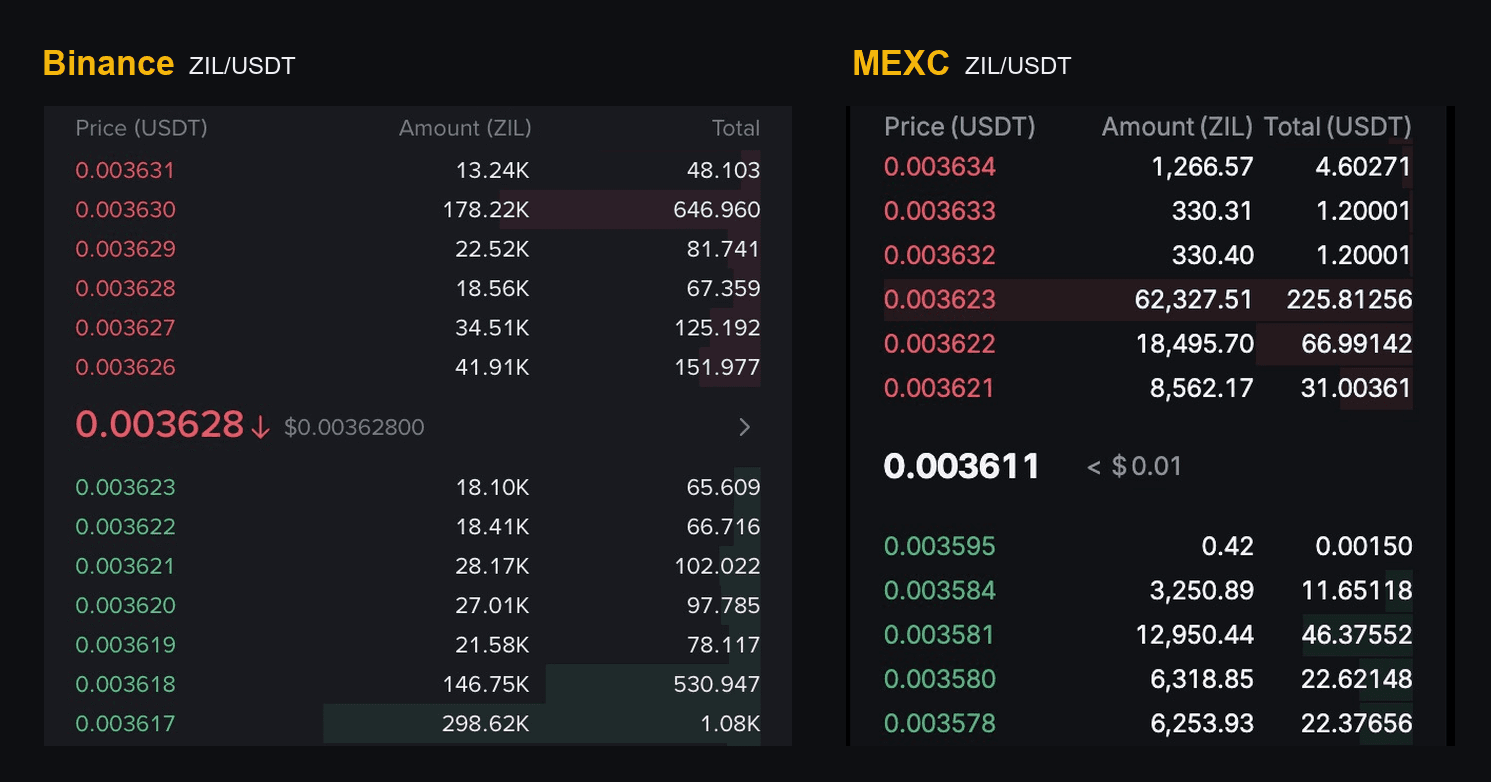
This guide uses two real order books for the same coin, ZIL/USDT, captured on Binance and on MEXC on 23 September 2026. Every number below comes straight from them.
What an order book is
An order book is the list of every limit order that is waiting to be filled on one market. Nothing in it has traded yet. Each row is somebody saying "I will buy (or sell) this many coins at this price, and not a cent worse."
It has two sides:
- Asks (red, top half). Offers to sell. The lowest ask is the cheapest price you can buy at right now.
- Bids (green, bottom half). Offers to buy. The highest bid is the best price you can sell at right now.
The two sides never overlap. The moment a buyer is willing to pay what a seller asks, the orders match and a trade happens. The matched amount leaves the book; whatever is left of the bigger order stays. What you see on screen is only what has not found a partner yet.
The anatomy of the screen
The image at the top of this page zooms in on the middle of both books, the part that matters most. Here is the whole screen on each exchange:
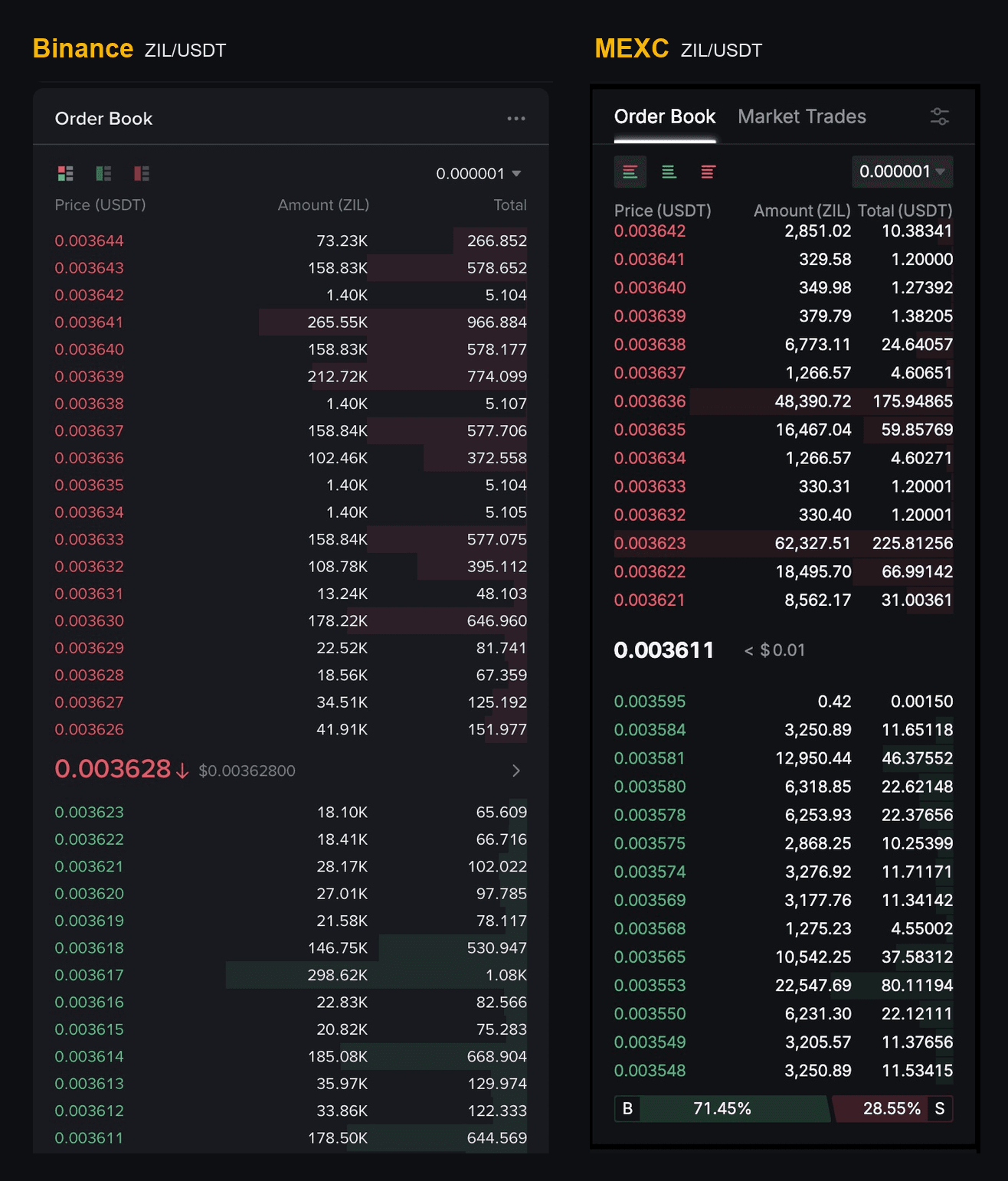
And here is what each piece means.
| On screen | What it tells you |
|---|---|
| Price (USDT) | The price of that row, in USDT per ZIL. Asks count up as you go higher; bids count down as you go lower. |
| Amount (ZIL) | How many coins are waiting at that price, all orders at that price added together. Binance shortens large amounts ("41.91K" means about 41,910 ZIL). |
| Total | Price times amount: the USDT value of that row. On both of these exchanges it is per row, not a running sum. |
| The big number in the middle | The last traded price: 0.003628 on Binance, 0.003611 on MEXC. Binance shows it in red with a down arrow because that trade was lower than the one before it, and adds its dollar value beside it. It is history, not a quote. Nobody has to trade there again. |
| The shaded bars | A quick visual of each row's size. The long green bar at 0.003617 on Binance means a lot of coins are waiting there; a tiny sliver means very few. |
| 0.000001 (top right) | The price step the book is grouped by. Choose a coarser step, such as 0.00001, and nearby rows merge, which makes deep books easier to scan. |
| The three small icons | Show both sides, only bids, or only asks. |
MEXC also shows a B / S bar under its book (71.45% B, 28.55% S in this capture). Treat it as a mood indicator, not a map: MEXC does not show what goes into it, and in this very capture the visible sell side holds about $610 against about $304 on the buy side, the opposite of what the bar suggests. The rows are what you actually trade against.
Best ask, best bid and the spread
The row closest to the middle on each side is the one that matters first:
- Binance: best ask 0.003626, best bid 0.003623. The gap between them, the spread, is 0.000003, about 0.08%.
- MEXC: best ask 0.003621, best bid 0.003595. The spread is 0.000026, about 0.72%, roughly nine times wider.
A tight spread means buyers and sellers agree closely on the price, which usually means an active, liquid market. A wide spread means you pay noticeably more to buy than you could sell for a second later.
Look at the size, not just the price
MEXC's best bid of 0.003595 holds just 0.42 ZIL, worth about $0.0015. It is technically the highest bid, and it is useless to anyone selling a real amount. The first bid with any size behind it is 0.003584, which makes the spread you would actually trade across about 1.03%, not 0.72%. Always check the Amount column next to the headline price.
Depth: how much you can trade before the price moves
Depth is how much is waiting on each side. Add up the Total column in the full screenshots above and the two books stop looking alike:
| Visible on screen | Binance | MEXC |
|---|---|---|
| Sell orders (asks) | about $6,229 over 19 rows | about $610 over 14 rows |
| Buy orders (bids) | about $3,745 over 13 rows | about $304 over 14 rows |
| Size at the best ask | 41.91K ZIL (about $152) | 8,562 ZIL (about $31) |
| Size at the best bid | 18.10K ZIL (about $66) | 0.42 ZIL (about $0.0015) |
Same coin, same moment, about ten times the depth on Binance. MEXC's book also has gaps: its asks jump from 0.003623 straight to 0.003632, and its bids from 0.003595 to 0.003584. A gap is a price where nobody is waiting at all.
Unusually large rows are called walls. Binance has one on the bid side at 0.003617: 298,620 ZIL, about $1,080. Walls act like a floor or a ceiling for a while, but remember that every order in the book can be cancelled at any moment. A wall is an intention, not a promise.
Market orders walk the book
A market order says "fill me now, at whatever it takes." It takes the best row first, and if that row is not big enough, it keeps eating into the next one, and the next. Every extra row is a worse price. The difference between the best price you saw and the average price you actually got is called slippage.
Here is what the same market orders would have cost on each book at the moment of these screenshots:
| Market order | Binance | MEXC |
|---|---|---|
| Buy $100 of ZIL | 1 row, average 0.0036260, 0.000% above the best ask | 3 rows, average 0.0036217, 0.020% above the best ask |
| Buy $500 of ZIL | 5 rows, average 0.0036276, 0.044% above the best ask | 8 rows, average 0.0036272, 0.170% above the best ask |
| Sell 20,000 ZIL | 2 rows, you receive $72.46 | 4 rows, you receive $71.63 |
| Sell 50,000 ZIL | 3 rows, you receive $181.10 | 11 rows, you receive $178.77 |
The 20,000 ZIL sale on MEXC averages 0.0035813, which is 0.38% below the 0.003595 "best bid" on screen, because that bid only covered 0.42 ZIL of the order. On Binance the same sale lands within 0.003% of its best bid. On a thin book, the price you see is only good for the first few coins.
A 10-second depth check
Before a market order, add up the Total column on the side you are hitting until it reaches your order size. The price on the row where you stop is roughly your worst fill. If that is far from the top row, split the order or use a limit order instead.
Why your limit order is not filling
A limit order is the opposite of a market order: "fill me at this price or better, and wait if you have to." If your price does not match anyone who is waiting, your order joins the book: as a new row at a new price, or at the back of the queue on a row that already exists. It fills only when someone else comes along and trades against it. That is where the waiting comes from, and there are four usual reasons it drags on.
1. Your price is on your side of the spread. A buy limit below the best ask, or a sell limit above the best bid, does not match anyone. On MEXC, a buy at 0.003600 would sit between the bids and the asks and become the new best bid. It fills only when a seller decides to sell at 0.003600, and on a quiet market that can take a long time, or never happen.
2. There is a queue in front of you. Better prices fill first, and orders at the same price fill in the order they arrived: first come, first served. Join Binance's bid wall at 0.003617 and you are behind about $1,080 of orders that were there first, all of which must fill or be cancelled before yours does. On top of that, about $941 of bids sit at higher prices (0.003618 to 0.003623) and fill before the wall does, so a seller has to work through roughly $2,021 of bids before reaching you.
3. The market is thin and quiet. A book like MEXC's, with $31 at the best ask and gaps between rows, is a book where few trades happen. Fewer trades means fewer chances for your order to be hit.
4. It filled, but only partly. A limit buy of 20,000 ZIL at 0.003621 on MEXC fills 8,562.17 ZIL straight away, which is everything waiting at that price, about $31. The other 11,437.83 ZIL stays in the book as a new bid at 0.003621 and waits like any other order. A partly filled order is easy to mistake for one that is stuck.
How to get filled faster
- Price it to cross the spread. A buy limit at or above the best ask (or a sell at or below the best bid) matches immediately, just like a market order, but with a price cap so it cannot run away from you. The part that fills right away pays the taker fee; anything left over rests in the book like any other limit order.
- Check the size behind the price first. If the best ask has $31 behind it and you want $500, expect to take several rows, or to wait for the rest.
- Move toward the front of the book. Pricing one step better than the best bid (buying) or best ask (selling) puts you first in line, instead of behind a queue at a busy price.
- Or accept the wait on purpose. Resting orders pay the maker fee, which on many exchanges is lower than the taker fee. That is a fine trade-off for a long-term buy. It is a bad one for arbitrage, where the price gap can close while you wait. Maker vs taker fees explains why arbitrage almost always pays the taker fee on both legs.
Why the last price can fool you
Look at the two big numbers in the middle of the books: 0.003628 on Binance and 0.003611 on MEXC. That is a 0.47% difference. It looks like you could buy on MEXC and sell on Binance for a profit.
Treat the two screenshots as one moment in time. You cannot trade at the last price, though. You can only buy at an ask and sell at a bid:
- Buy on MEXC at its best ask: 0.003621.
- Sell on Binance at its best bid: 0.003623.
The real gap is 0.055%, before fees. With taker fees of 0.05% and 0.1% on the two legs, it becomes a loss of about 0.1%, and that is before moving the coins between the exchanges. Going the other way is worse: buying Binance's ask and selling into MEXC's bid loses about 0.86% before fees.
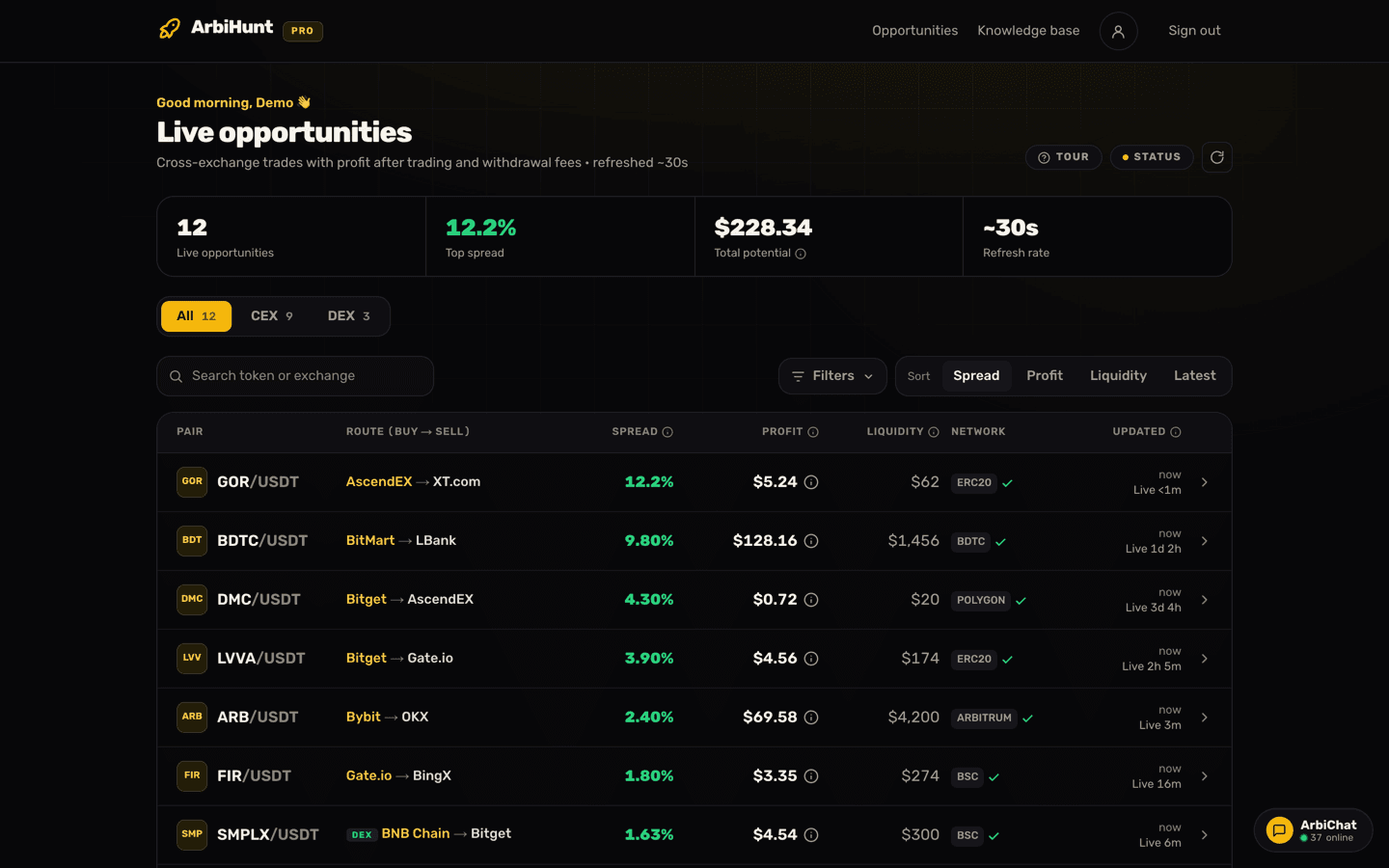
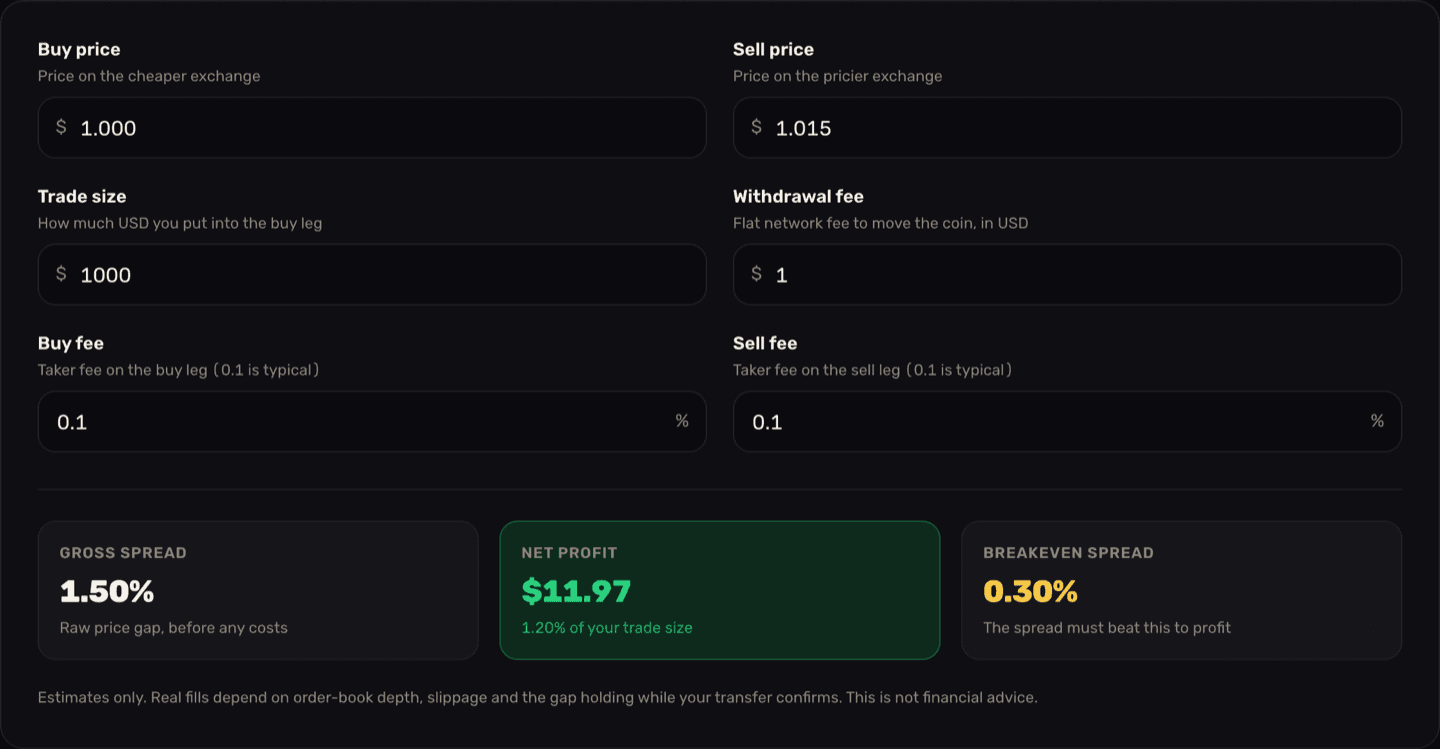
This is exactly why ArbiHunt never compares last prices. Every exchange-to-exchange opportunity is built from the lowest ask on the buy exchange and the highest bid on the sell exchange, the two prices you can actually hit, and both are shown on the opportunity page, one per leg. The profit is sized to the depth actually sitting behind those prices, not to the top row alone, and it is after both taker fees and the withdrawal fee for moving the coin. Understanding the opportunity details walks through that screen, and Spread vs. net profit shows how a spread shrinks into take-home profit.
On-chain (DEX) opportunities work a little differently, because a decentralized exchange pool has no order book at all. Every number on those is for the one trade shown: the exchange leg shows your average price across its order book for that size (Avg buy price or Avg sell price), and the on-chain leg shows the swap price, KyberSwap's live quote for exactly the amount its button opens with. Walking the book is already in the average, so what you see is what that size gets.
Let ArbiHunt read the books for you
ArbiHunt compares the lowest ask and the highest bid across exchanges, checks the depth behind them, and nets out taker fees, so a gap like 0.47% on paper does not reach you as an opportunity when it is really 0.055%.
Order book checklist
- Read both sides. The best ask is what you pay; the best bid is what you get. The last price is neither.
- Check the size next to the price. A top row of 0.42 coins is decoration.
- Add up the Total column (or the Amount column, if you are selling coins) until it covers your order. The row where you stop is roughly your worst price.
- Watch for gaps and walls, and remember that any order can vanish before you reach it.
- Use the price grouping to see deep books at a glance.
- For a limit order, decide whether you need it filled now (cross the spread, pay taker) or can wait (rest in the book, pay maker).
- Books change by the second. The screenshots here are a snapshot from 23 September 2026. Re-check the live book right before you trade.
Before you trade
ArbiHunt is an information tool. It never connects to your exchange accounts, never asks for API keys, never holds funds and never places a trade. Every order is yours. Order books can change in the time it takes to click, and depth you see can be cancelled before your order arrives. This guide is educational and not financial advice, and crypto trading carries risk.
See it live
ArbiHunt scans 26 exchanges in real time and ranks every spread by true net profit, after fees, withdrawals and live liquidity.