Every figure on the ArbiHunt board is a measurement of a real order book, taken at a moment in time. That makes it far more useful than a price ticker, and still less than a guarantee. This page sets out exactly where the numbers come from, how fresh they are, when they stop being true, and what ArbiHunt is and is not claiming.
Where the prices come from
ArbiHunt watches 26 exchanges and roughly 15,000 markets, re-reading them on a loop of about 30 seconds.
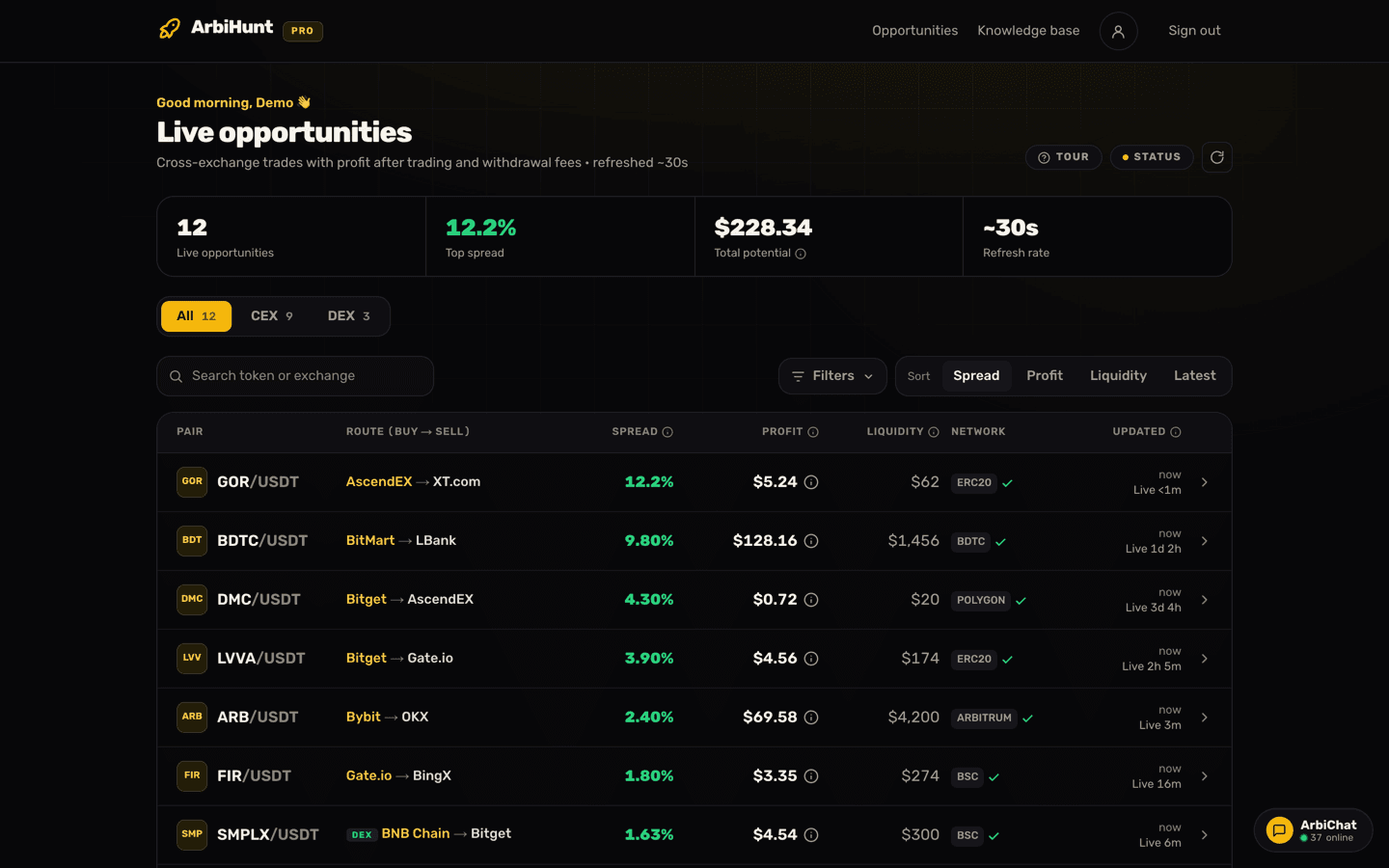
The important part is which price it reads. A price ticker gives you a last-traded price or a mid-price, and neither is a price you can actually get. ArbiHunt takes the lowest ask on the buy exchange and the highest bid on the sell exchange, which is what your market order would hit. That is why the opportunity detail page labels the two numbers "Lowest ask" and "Highest bid" rather than just "price".
Liquidity is measured the same way: real order-book depth in dollars sitting behind the quote, shown for the buy leg, the sell leg and the opportunity as a whole. A 9% spread with $40 of depth behind it is a $40 opportunity, not a 9% one, and the board puts both figures on the same row so the difference is hard to miss.
Executable, not indicative
Every price on the board is one somebody is currently offering. It is still a snapshot: quotes move, and the depth behind the best quote is often thin.
What the profit includes, and what it leaves out
Every row carries two different numbers, and only one of them is what the trade leaves you. The profit on every row is after the taker fee on both legs, the depth actually available, and the exchange withdrawal fee on the cheapest network open for withdrawals on the buy exchange and deposits on the sell exchange. The percentage beside it is the spread: the raw price gap before any of those costs. A trade that would lose money after the withdrawal fee is not listed.
The arithmetic on a $1,000 trade, with a coin at $1.0000 on the buy venue and $1.0200 on the sell venue, 0.1% taker fees on both sides:
- The raw gap is 2.00%.
- The 0.1% buy fee costs $1.00, so $999 of coin is bought.
- Selling those units at $1.0200 raises $1,018.98, and the 0.1% sell fee takes $1.02.
- You are left with $1,017.96, which is $17.96 before the coin has moved.
- The withdrawal costs, say, $2.00 on that network, so the profit reads $15.96 beside a 2.00% spread. PRO members who tap the (i) beside it see $17.96 before the $2.00 withdrawal fee, line by line.
The free arbitrage calculator does the same arithmetic on your own numbers, transfer fee included, so the figure under its Net profit line matches the $15.96 the board would show for the same trade. It also gives you the breakeven spread, about 0.40% for those inputs: below that gap the trade loses money however good it looks. See also Spread vs net profit and Withdrawal fees explained.
Two limits are worth knowing. The withdrawal fee has to be one we can confirm. Some exchanges publish no fee, and some publish a 0 on routes where every other venue charges, so a 0 counts as free only where we have checked it. When the fee is unknown, nothing is deducted for it: the detail page's Costs card reads "Not published, not deducted", the PRO calculation marks it "not deducted" with a gold alert glyph, and the profit on that row is before the fee. Check it on the exchange and take it off yourself. And the profit is for one trade size, the one the order books could take when they were measured. A smaller trade still pays the whole flat withdrawal fee, so it keeps less than a proportional share.
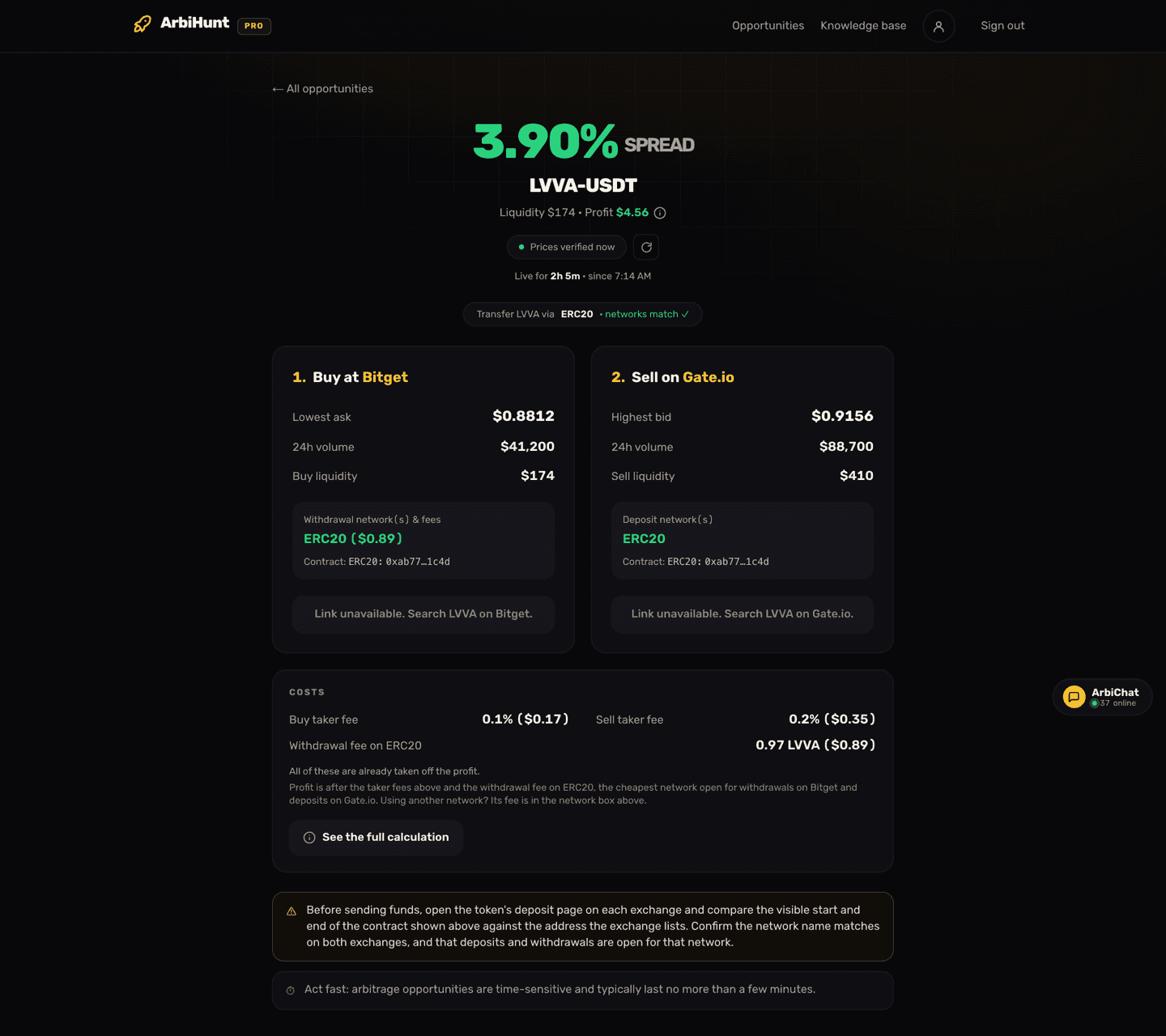
Every field on this screen is explained in Understanding the opportunity details.
How fresh is the row you are looking at?
Two clocks run at once, and they are worth telling apart.
The scan clock. The backend re-reads the exchanges roughly every 30 seconds, and each opportunity carries the timestamp of when its prices and liquidity were last checked. On the board that shows at the end of every row as a live-ticking age: "8s ago", "34s ago". On the detail page it is the chip reading "Prices verified 8s ago", with a green pulsing dot. Past 60 seconds that chip turns amber and stops pulsing, which is a prompt to refresh, not a fault.
Your browser's clock. The dashboard and the detail page refetch every 30 seconds, and both have a manual refresh button. That refresh pauses while the tab is hidden and fires the moment you return to it, so a board left open in a background tab is not quietly updating behind you.
Read the age before you read the numbers
The age counts in seconds for the first ten minutes, so a row reading "180s ago" is carrying prices three minutes old. In arbitrage that is a long time. Refresh first, then decide.
What a stale row actually means
An opportunity can also fall off the live board between the moment you see it in the list and the moment you open it. Rather than throw a 404, ArbiHunt serves the last recorded version behind an amber banner saying the prices may be outdated, with how long ago they were recorded. Rows older than 24 hours are not served at all: you get a "This opportunity is no longer live" screen and a link back to the board.
A stale row is not broken data, then. It is the last true reading of something that has since moved, kept visible so you can see what happened instead of being told nothing.
Why a spread can be gone before you trade
A spread that looks excellent on the board can still be untradeable by the time you act. The usual reasons:
- The window closed. The detail page warns that these opportunities typically last no more than a few minutes. Other traders close the same gap.
- The depth was thinner than your size. The quoted price is the best price, available for a limited amount. Trading past it walks you up the book and eats the spread.
- Deposits or withdrawals were disabled. An exchange can halt a coin's transfers at any time for maintenance, a wallet upgrade or risk controls. If the coin cannot leave the buy venue or land on the sell venue, the trade cannot complete.
- The network did not match on both sides. A transfer network has to work on the sending and the receiving exchange. ArbiHunt shows the networks per leg and adds a "networks match" mark when they line up, but the final check is yours. See Choosing the right network.
The same ticker is not always the same coin
A symbol can be a migrated, wrapped or entirely unrelated contract on the other exchange. ArbiHunt shows the contract address on both legs (a PRO feature) so you can compare them against what each exchange lists on its deposit page. Confirm the contract and the network before you send anything: a wrong-network transfer can be unrecoverable.
Exchanges get paused, and the board says so
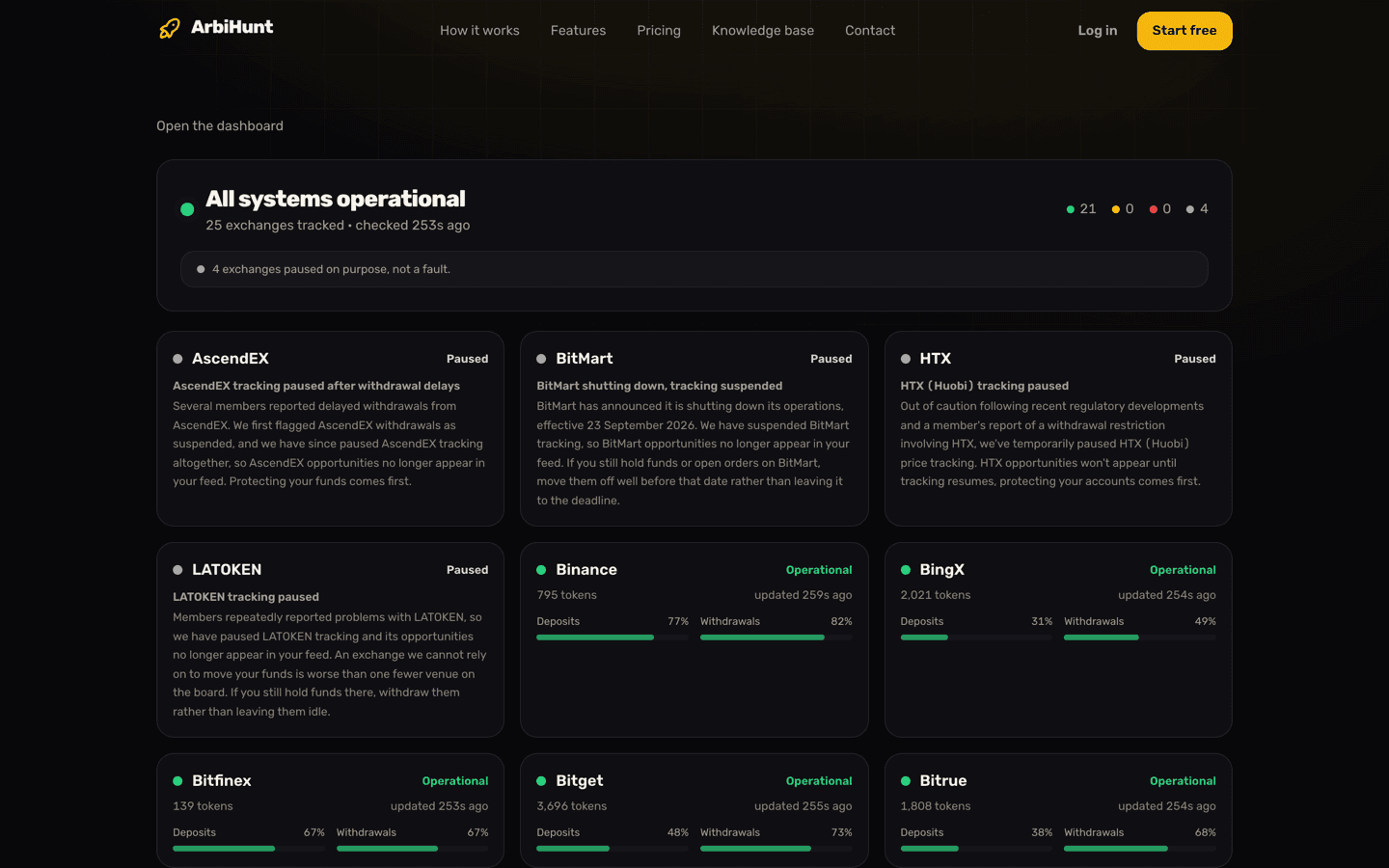
ArbiHunt tracks 26 exchanges, but not all of them are live at all times. When a venue becomes unreliable, for example after members report stuck withdrawals, tracking is paused on purpose: its opportunities leave the feed, and it is listed as Paused on the status page with the reason written out.
The status page, pictured at the top of this article, also reports on the venues that are running: what share of each one's tracked tokens currently has deposits open, and the same for withdrawals. Health comes from how far behind an exchange's data has fallen against the freshest one, more than 15 minutes reads as Degraded, more than an hour as Down. A deliberate pause never colours the headline red, because a tracker switched off to protect members is not an outage.
The disclaimer, in plain English
ArbiHunt is information, not advice. Nothing on the dashboard, in this knowledge base, or in the apps is a recommendation to buy, sell or transfer any asset. There is no personalised advice here, and nobody at ArbiHunt knows your circumstances.
ArbiHunt places no trades and holds no funds. It is read-only by design: it never connects to your exchange accounts, never asks for API keys, and never touches your balances. The "Check on ..." buttons simply open the relevant exchange in a new tab. Every order is placed by you, on your own accounts, with your own keys.
No profit is promised. The figures are readings of third-party exchange data, not an audit of those exchanges, and they describe a moment that has already passed. Spreads close in seconds, prices move while funds are in transit, withdrawals get suspended, order books are thinner than they look, and coins sent over the wrong network can be lost. A displayed opportunity is not a promise that it was, is, or will be profitable. Risks of crypto arbitrage covers the failure modes in full.
You are responsible for your own trades. Before committing capital, confirm on both exchanges that the prices still hold, that the spread survives the fees, that deposits and withdrawals are open for that coin, and that the networks and contract addresses match. How to execute an arbitrage trade walks that check through in order. Only trade with money you can afford to put at risk.
Your use of ArbiHunt is governed by the Terms of Use, and what happens to your data is set out in the Privacy Policy. If something on the board looks wrong, tell us at contact@arbihunt.com, a bad number is worth fixing.
See the full route before you commit
PRO shows the profit in dollars on every opportunity with its step-by-step calculation, the contract address on both legs, and filters for minimum spread, liquidity, exchange and network, so you can check a trade before you fund it.
See it live
ArbiHunt scans 26 exchanges in real time and ranks every spread by true net profit, after fees, withdrawals and live liquidity.